
Virtual Staging for Property Managers: Save Time & Money
A detailed overview of the capabilities of AI Virtual Staging for property managers: how to reduce apartment vacancy periods, properly prepare photos, choose a style for the target tenant, maintain transparency in listings, and increase the speed of leasing properties through high-quality online marketing.
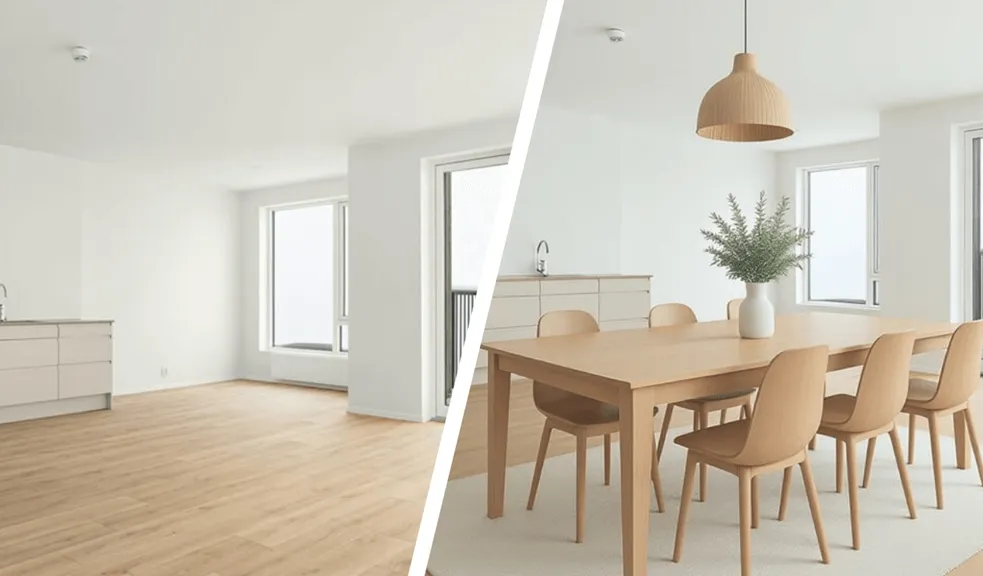
Table of Contents
- Introduction
- What is Virtual Staging for Rental Properties?
- Why Virtual Staging is Effective in the Rental Market
- Capabilities of AI Virtual Staging for Property Managers
- When Property Managers Should Use Virtual Staging
- Photography Guidelines for Rental Listings
- Which Rental Units Benefit Most
- Choosing the Right Style for Your Target Tenant
- Key Rules for Rental Listings to Follow: Transparency and Compliance
- How to Use Virtual Staging in Your Rental Marketing Strategy
- What to Consider When Choosing a Virtual Staging Service for Property Management
- Summary: A Smarter Way to Reduce Vacancy
Introduction
Why vacant units cost more than you think
A vacant apartment (i.e., a space without furniture) for a property manager means lost revenue.
If the average rent in your building is $1,500 per month, every vacant week costs approximately $375. Multiply that by 10 units and a 30-day turnover, and you get $15,000 in unrealized revenue. Add utilities, cleaning, marketing, and staff working hours — and the real costs increase.
According to YCharts, the U.S. rental vacancy rate has fluctuated between 6% and 8% in recent years. Even improving occupancy by 1–2% will have an impact on the annual net investment income for mid-size portfolios. For large multifamily operators, reducing vacancy by just a few days per unit per year translates into tens of thousands of dollars.
Therefore, virtual staging for rental properties is a solution that is more practical than purely decorative.
The Digital-First Rental Market in 2026
According to The National Association of Realtors, almost all home buyers begin their search online. Times Ten Design reports a specific percentage – 95% of buyers.
In 2025, 52% of people purchased a home that they found online. In the chart below, you can clearly see the total dominance of the internet in this process.
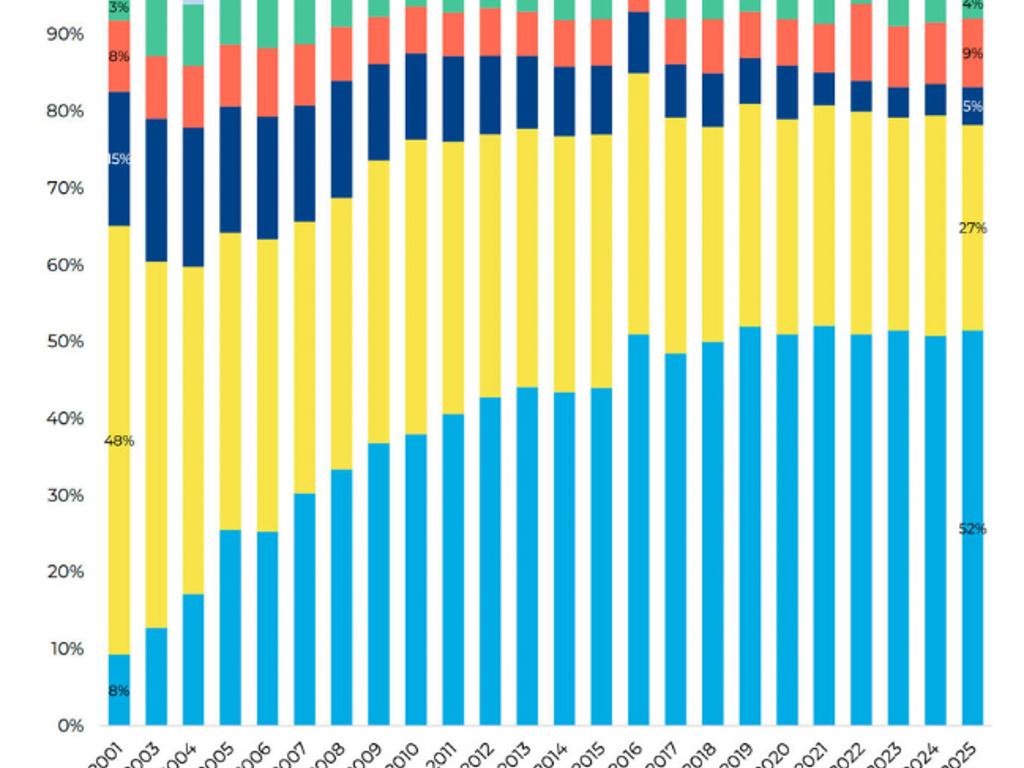 Where Buyer Found the Home They Purchased, 2001-2025
Although this research concerns home purchases, tenant behavior is similar: Zillow, Apartments.com, Realtor.com, and Facebook Marketplace are the first points of contact.
Tenants quickly scroll through pages, make emotional decisions, and often send inquiries for only one to three properties at most.
In this reality, photographs become part of the apartment marketing strategy. To some extent, they determine whether a potential tenant clicks on the listing or moves on. According to Zillow, listings with high-quality visualizations receive significantly more engagement, specifically:
- ~68% more page views
- ~66% more saves
- ~63% more shares
Such digital trends dominate the rental market — and they cannot be ignored. Especially if you plan to become a successful property manager in your niche.
How Virtual Staging Helps Lease Faster
When listings show empty rooms, potential tenants find it difficult to understand several key aspects:
- What is the actual size of the living room?
- Will a corner sofa fit without blocking the balcony entrance?
- How does this layout feel in practice?
Stylized images immediately answer these questions.
By using virtual staging for rental properties, you demonstrate context, scale, and functionality. This reduces uncertainty for potential tenants. Fewer doubts mean faster application submissions, which helps increase leasing speed and ultimately reduce vacancy rate.
What is Virtual Staging for Rental Properties?
Definition in the Property Management Context
Virtual staging is the process of computer-based interior modeling. Using AI, photos of empty or outdated spaces are filled with furniture, decor, and finishing elements.
Instead of renting furniture, hiring movers, coordinating installation, and waiting several days or weeks, you simply:
- Take high-quality photos of the space in its current condition.
- Upload the photos to digital staging software.
- Select the intended purpose of the room (office, apartment, commercial space).
- Use AI to model the space according to the chosen style.
- Receive renderings for the listing — often within a few minutes.
Unlike Photoshop collages, virtual staging software (such as RoomStaging) has architectural logic and can analyze the geometry of the space. The system recognizes:
- entry points;
- window openings;
- light sources and light direction;
Thus, AI does not blindly overlay objects but integrates them considering ergonomics, natural movement flows, and functional space zoning.
For a property manager, this means scalability (especially when dealing with dozens of units per month).
What Is Better for Rentals: Virtual or Traditional Staging?
Before making a decision, it is useful to compare both approaches.
| Criterion | Virtual Staging | Traditional Staging |
|---|---|---|
| Preparation time | From a few seconds to 48 hours | 5–14 days |
| Logistics | 100% online | Physical delivery and installation |
| Style flexibility | Unlimited number of styles | Limited to available furniture |
| Cost per unit | From $1 to $50 | From $1,500 to $4,000+ |
| Scalability | Designed for high volumes | Difficult for large portfolios |
After reviewing the numbers, the difference between traditional and virtual staging costs becomes obvious.
Traditional staging still makes sense for premium rental apartments where key decisions are made during in-person showings. However, for most portfolios, apartment virtual staging provides a similar visual effect without operational and logistical complications.
In other words, in 90% of rental scenarios, the digital solution wins — at least in three key indicators: speed, cost, and scalability.
Why Virtual Staging Is Effective in the Rental Market
Tenant Psychology and First Impressions
Approximately 75% of all information processed by the brain comes through vision. Moreover, visual images are processed by the brain 10,000 times faster than text data.
This is especially noticeable when tenants browse listings. They do not analyze the area of the room or technical specifications first. Initially, they evaluate comfort, lighting, furniture layout, and the overall feeling of the space.
For better understanding, let's compare staging vs empty apartment photos.
| Empty Apartment Photos | Staging Photos |
|---|---|
| The space appears smaller. | The space feels large and functional. |
| The room feels cold and unwelcoming. | It feels cozy and has an attractive atmosphere. |
| It is difficult to imagine how the room can be used. | The room's function and usage possibilities are immediately visible. |
| Minimal design solutions are absent; everything looks abstract. | It is easy to see how to arrange furniture and use the space. |
| Lower tenant engagement. | Increases interest and results in more viewing requests. |
Details truly matter. A sofa shows proportions. A bed defines the purpose of the room. A dining table suggests gatherings and shared meals. These small cues help tenants quickly “read” the room. This clarity stimulates engagement — one of the main benefits of virtual staging.
Leasing Speed and Vacancy Reduction Statistics
The report by the National Association of Realtors provides interesting data: furnished apartments/homes sell faster because buyers find it easier to imagine how they will live there. This effect was noticed by 83% of buyers' agents.
At the same time, sellers' agents report that furnished properties spend 73% less time on the market. According to other estimates, furnished properties are rented up to twice as fast, and are sold at 61% more expensive.
Although rental data varies depending on the market, the behavioral logic is the same: better presentation shortens decision-making cycles.
For property managers, reducing the average vacancy by even 7–10 days per unit significantly impacts annual revenue (fewer idle days, faster unit turnover, more stable cash flow). This represents the operational value of rental property marketing tools.
ROI for Property Managers
Let's consider a model example to evaluate savings. Assume the average rent per apartment is $1,800. Reducing the vacancy period by 10 days per unit generates additional income (from saved time) of approximately $600.
The cost of virtual staging for one apartment is less than $50. Therefore, the ROI (return on investment) pays off multiple times on a single unit — more than 500%.
Now let's scale it: 20 apartments per year × $600 savings = $12,000 in additional revenue. And this with expenses of less than $1,000 for virtual staging.
Does it provide other advantages? Yes, and here they are:
- Faster apartment occupancy means fewer days without income.
- Savings on delivery, installation, arrangement, and removal.
- Easier application across the entire portfolio (especially if you manage dozens or hundreds of units).
For comparison: in traditional staging, costs increase with each month the property remains on the market. Over two months, it can reach approximately $3,400.
Capabilities of AI Virtual Staging for Property Managers
Digital staging software combined with AI has significantly simplified the workflow. This is good news: the full cycle (from uploading photos to publication) takes less than one hour. Traditional staging, in contrast, requires one to two weeks. This means preparation for publication has accelerated by at least 168% and up to 336%.
Step 1: Prepare the photos
Take high-quality photos of the space using a smartphone or professional camera. For the best final result, choose clean, well-lit shots with a resolution of at least 2000px and a level horizon.
Step 2: Download
Log in to RoomStaging and upload the selected files. Within 15 seconds, the system performs an instant preliminary analysis: it recognizes the basic geometry of the room, architectural boundaries, and existing light sources.
Step 3: Choose a style
Define the functional purpose of the space (living room, bedroom, office) and the style (retro, Scandinavian, etc.). If necessary, add notes regarding the color palette, furniture density, and other details.
Step 4: Generate
Within 30 seconds, AI analyzes the volume of the room, identifies the location of windows and doors, and integrates furniture from the digital library. It then creates shadows and reflections, taking into account the direction of light, which adds realism.
Step 5: Publish the listing
Review the result and, if it meets your expectations, download the high-quality image. If not, try again.
In less than 60 minutes, you have a visual ready to be posted on all real estate platforms.
When Property Managers Should Use Virtual Staging
Virtual staging is suitable for any type of property (residential/commercial) at different stages (new or renovated). However, there are several situations where it brings maximum benefit:
- After tenant move-out. Empty apartments often remain on the market for up to 90 days without viewings. Virtual staging allows you to quickly and affordably ($19) furnish the space and publish photos within 24 hours. It is a fast way to attract leads without spending a week and more than $1,700 on traditional staging.
- Before a new development launch. For apartments at the construction stage or before a sales launch, visualizing future spaces increases the number of pre-applications. Sales can increase by 30–50% thanks to bright and realistic images.
- For multifamily units. Maintaining a consistent style across different floor plans is difficult. With digital staging, it is easier. AI tools generate renders consistently and harmoniously. Such multifamily marketing solutions simplify marketing and increase the overall attractiveness of the complex.
- For marketing pre-leasing. By showing tenants furnished apartments before construction is completed, you capture their interest. As a result, the likelihood of signing the lease agreement earlier increases.
- For renovation positioning. Virtual staging shows what the apartment will look like after renovation or furniture updates. Often, when tenants see a modernized living area, they are willing to pay 10–20% more.
In any case, virtual staging accelerates apartment leasing and increases their market value. In the context of rental property marketing, this is exactly what is needed.
Photography Guidelines for Rental Listings
The quality of generated renders directly depends on the original photo. The best apartment marketing tools cannot fix a blurry or dark image. However, it is possible to take great photos using a smartphone if you:
- Use wide-angle mode (0.5x) but avoid the “fisheye” effect.
- Enable HDR mode and maximum resolution.
- Activate the grid feature in the camera settings.
- Use a tripod if possible.
- Hold the camera at eye level (140–160 cm).
- Stand strictly in the corner of the room for maximum coverage.
- Shoot between 10:00 and 15:00 with curtains open and lights turned on.
- Remove trash and personal items from the room.
Most often, photos are ruined by shooting from the center of the room (which visually reduces the space), a tilted horizon, and dark corners due to turned-off lamps.
It is also not recommended to shoot from the position where future furniture will stand because AI will have difficulty reconstructing perspective.
Which Rental Units Benefit Most
Virtual staging is suitable for any rental strategy, but it provides the greatest benefit for certain properties:
- Studio apartments. AI demonstrates smart zoning. It proves that both a relaxation area and a workspace can fit into a small area.
- Family units. It is important to show the functionality of each room. Staging visualizes a cozy living room, a comfortable children's room, and spacious storage systems.
- Luxury rentals. Premium furniture in renders highlights the property's status and justifies a high rental price.
- Student housing. The focus is on ergonomics and modern design. Visualization of a convenient workspace and social area attracts young tenants.
- Build-to-rent. Staging creates a unified visual standard for the entire residential complex. It accelerates mass leasing and builds a recognizable brand for the new development.
Thus, a property manager can more precisely tailor marketing to the target audience and attract higher-quality leads while accelerating property leasing.
Choosing the Right Style for Your Target Tenant
The right visual works as a filter: it attracts target leads and screens out those for whom the property is not suitable. Therefore, it is important to choose the style correctly.
1. Minimalist
Focuses on space and clean lines. Calm colors (gray, beige, white).
- For whom: Young professionals (25–40 years old), singles or couples without children.
- Benefit for the manager: Such an interior looks “expensive” in photos, which allows maintaining the rental rate at an above-average level.
2. Scandinavian
Maximum light, wood, pastel tones, and plenty of cozy textiles.
- For whom: Families with children and couples looking for comfort.
- Benefit for the manager: This style appeals to 90% of people and is therefore the safest option for fast leasing.
3. Loft / Industrial
Raw brick, concrete elements, and metal. Suitable for spaces with high ceilings and large windows.
- For whom: The creative class, young urban residents.
- Benefit for the manager: Allows cost savings. An unplastered wall or exposed pipe is not a flaw but a stylish feature that tenants are willing to pay for.
4. Retro
Combines the aesthetics of the 1950s–60s with the comfort of 2026. Recognizable by thin wooden furniture legs and color accents (mustard, olive).
- For whom: Millennials.
- Benefit for the manager: The style creates a sense of uniqueness. Therefore, photos with such design receive more saves and shares on social media.
It is better to generate one space in different styles and test which visual the market responds to faster.
A Few Rules for Rental Listings to Follow: Transparency and Compliance
For a property manager, virtual staging is a way to manage expectations. If a client feels deceived during a viewing, you will simply waste your time (and the owner's time) on an empty visit.
1. Ethical labeling and legal safety
Always add a small caption in the corner of the photo: “Virtual staging,” “Digital design,” or “Virtually staged.” For rentals, this is even more important than for sales because a tenant wants to understand whether the furniture is included in the price.
Never cover carpet stains or holes in the walls with digital sofas. The tenant will see them during the viewing, and you will lose the deal.
In addition, most international platforms (such as MLS) allow staging only if the images are properly identified. This protects you from complaints about misleading advertising.
2. Gallery placement strategy
For maximum transparency and engagement, use one of two proven approaches:
- Marketing approach. The staged photo comes first (to generate clicks), followed by the real view of the room (for transparency).
- Comparative approach. Place “Before” and “After” photos side by side. In this case, the generated images will be perceived as ideas for inspiration.
There is no single best approach. Align the choice with your marketing strategy.
3. Communication when scheduling a viewing
When confirming the appointment by phone or chat, the manager should say something like: “Please note that the apartment is rented unfurnished. The photos in the listing are only an example of how the space can be arranged.”
This filters out those who are looking only for furnished housing and saves your time for target clients.
How to Use Virtual Staging in Your Rental Marketing Strategy
To maximize occupancy, use visualizations as the primary tool across all platforms.
On Zillow and MLS, the staged image should be the first photo in the gallery. Preferably, use a consistent style for all apartments and include room dimensions or floor plans.
On your own website, implement “Before/After” sliders, 3D tours, and furnishing options that demonstrate the potential of the space.
In paid advertising, renders perform better than real empty photos because social media sells emotion. Indicate the key advantages of the apartment directly on the visualization — location, size, renovation.
What to Consider When Choosing a Virtual Staging Service for Property Management
First of all, focus on realism: check the softness of shadows, geometry, and reflections. Furniture that looks glued onto the image only scares clients away.
Select options that offer a turnaround time of no more than 48 hours. This will be important later when the task is to minimize vacancy.
Check for full commercial rights to use the photos indefinitely in marketing.
Ideally, the service functionality should include:
- A Furniture Removal feature.
- Light and color correction.
- Ready-made styled rooms for each type of unit.
This saves time searching for separate retouchers and allows you to manage the portfolio more efficiently.
Summary: A Smarter Way to Reduce Vacancy
Every vacant day means lost income for the owner and unstable cash flow for the company. If weak photos slow down leasing, the number of quality applications also drops sharply.
Virtual staging helps property managers both enhance listings and scale marketing. Is that accurate? Yes, because interest in properties increases with minimal budget expenses.
Ultimately, the question is not whether the apartment looks aesthetic on the screen. What matters more is how quickly, thanks to rental listing optimization, it stops being vacant and starts generating profit.