
Virtual Staging for Interior Designers: Showcase Your Vision
A detailed guide for interior designers: how to use AI virtual staging to prepare photos, select styles, create renders, and speed up the approval of design concepts.
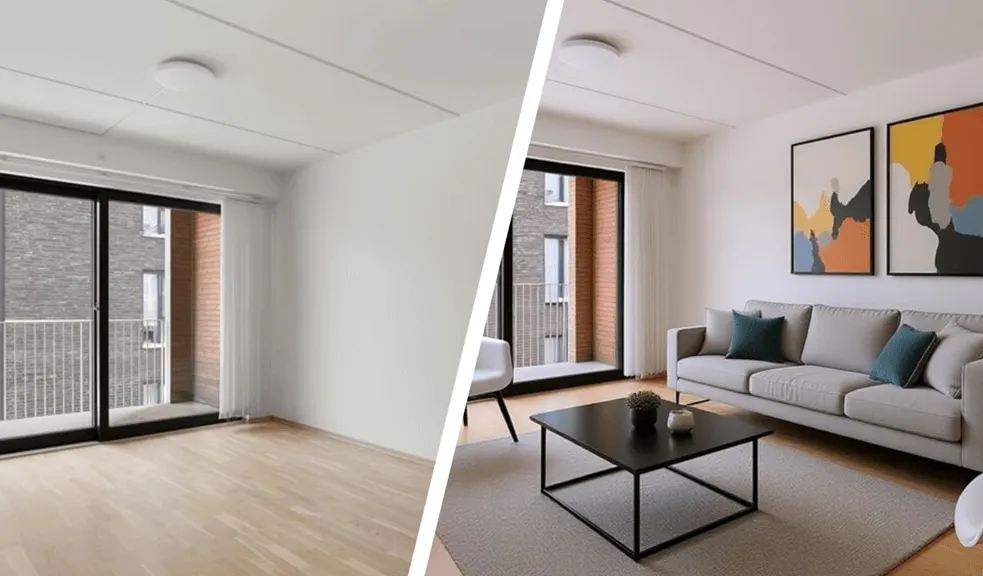
Table of Contents
- Introduction
- What is Virtual Staging in Interior Design?
- Why Virtual Staging Works for Interior Designers
- How AI Virtual Staging Transforms Workflow
- In Which Situations Virtual Staging Is Especially Useful for Interior Designers
- Tips for Interior Designers on Photography
- Which Interior Projects Benefit Most from Virtual Staging
- Popular Styles for Interior Design Projects
- How Interior Designers Can Work with Virtual Staging
- Marketing Potential of Virtual Staging for Designers
- How to Choose a Virtual Staging Service That Won't Disappoint
- Summary: A More Efficient Way to Present and Sell Design Ideas
Introduction
Why Empty Spaces Limit Design Value
Empty space almost always reduces the perceived value of interior design. And it's not just about aesthetics – the problem runs deeper. Up to 81% of people find it easier to perceive a space when it is visually styled. This is easy to explain: a ready-made context removes uncertainty and allows a faster emotional impression to form.
If a client sees bare walls around them, they cannot easily “read” the space and are therefore less inclined to invest. For a designer, this means a loss of perceived value. That is why solutions like virtual staging are used by designers as a way to add context, scale, and a clear function to a space (without physically altering the interior).
The Rise of Digital-First Interior Design
Interior design has fully shifted into a digital-first environment: the first interaction with a client almost always happens online (through a portfolio or social platforms), as 95+% of people search for real estate on the Internet.
According to the National Association of Home Builders, visual materials influence home-buying decisions. This directly applies to interior design: clients evaluate not the process, but the final look of a space – and they do so within seconds.
Platforms like Zillow, report that listings with high-quality images generate approximately 60%+ more engagement and views. Some sources even suggest increases of up to 118%.
This once again highlights that design today is “sold” through visuals. The transformation of the industry is also changing the role of the designer, who is now increasingly involved in the digital presentation of spaces. This is made easier with AI virtual staging tools.
How Virtual Staging Improves Client Decision-Making
One of the main challenges in a designer's work is that clients cannot always imagine the final result. Plans, drawings, digital mood boards, or 3D models often fail to convey the full sense of space. As a result, clients have doubts and ask more questions. This slows down the process and negatively affects conversion.
Virtual staging services demonstrate clear practical value. With styled images, a designer can:
- show the real scale of furniture and zoning;
- adapt a single space to different styles (minimal, modern, luxury);
- create a “Before/After” effect for presentations.
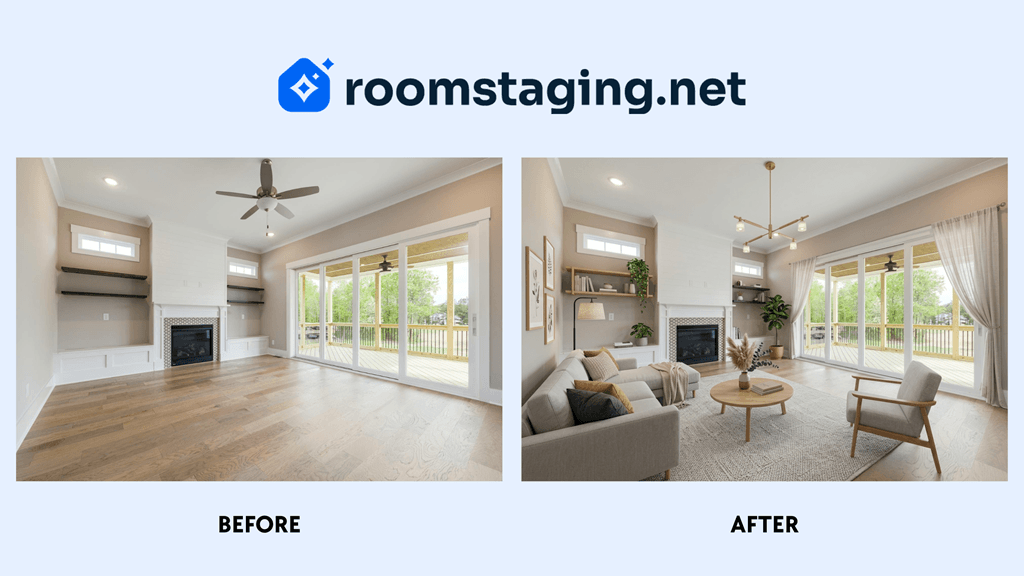 Visualization helps the client make decisions faster
As a result, clients make decisions faster, and the level of trust increases. Overall, virtual staging in interior design enhances the value of services and helps professionals sell higher-priced concepts.
What is Virtual Staging in Interior Design?
A Practical Definition for Designers
Virtual staging refers to the digital styling of a space that allows designers to present a finished interior without physical implementation. The client immediately sees the final look of the space with furniture, lighting, and functional zoning.
To ensure proper integration of objects (taking into account perspective, lighting, and proportions), 3D modeling and AI are used. The process typically looks like this:
- Create a base. Photograph the space or find a 3D render without furniture.
- Add materials. Upload the image to virtual staging software for interior designers (e.g., RoomStaging).
- Choose a style. Select from available options (typically classic, retro, Scandinavian, etc.).
- Fill the space. Instruct the software to generate the design based on the room's purpose and chosen style.
- Final visualization. Receive ready-to-use images for presentations, portfolios, or concept sales.
3D staging for interior design projects can generate multiple versions of the same space within minutes. Moreover, designers can test different design solutions without spending additional budget.
Virtual vs Traditional Staging in Design Workflows
Today, designers can no longer ignore the growing popularity of virtual staging. To stay competitive and retain clients, they increasingly face a choice: traditional staging or 3D technologies. The difference is best seen in efficiency:
| Criterion | Virtual Staging | Traditional Staging |
|---|---|---|
| Time | From a few seconds to 48 hours | From several days to two weeks |
| Format | Fully online | Physical presence required |
| Style flexibility | Unlimited | Limited by available furniture |
| Cost | $15–50 per image | 1500–4000+ per property |
| Scalability | Easily scalable | Limited by resources |
| Iterations | Fast design changes | More complex and costly |
Physical staging remains relevant for premium projects or offline presentations. However, in most cases, virtual staging services for designers provide the optimal balance of speed, cost, and quality.
So what should a modern professional do? Use digital home staging as a core tool (in particular, between the stages of concept development and final rendering), and apply physical solutions only where they are truly justified.
Why Virtual Staging Works for Interior Designers
Features of Client Interaction with Design
Photorealistic 3D visualization that accurately conveys lighting, materials, and composition is the foundation of communication between a designer and a client. The client clearly sees the final result before any work begins. The risks of misunderstandings during implementation are minimized.
The use of eye-tracking technology in scientific research has shown that visual signals allow people to evaluate interiors with high accuracy. Objective factors (such as lighting) are perceived at approximately 72%, while subjective ones (atmosphere, comfort) at about 67%.
Thus, visuals play a key role in shaping the perception of a future space. Clients respond not just to an image, but to the depth of information created through virtual furniture staging. This perception directly strengthens trust in the designer and increases willingness to invest in the project.
Digital Visualization Improves Clarity and Engagement
Another important aspect is how visual materials influence client interaction with a project.
People who rely on visual materials when making decisions work 323% more efficiently than those who work only with text or drawings. This significantly strengthens the position of staging and 3D renderings as communication tools in design.
In other words, when a client receives from a designer not only a plan or description but also a realistic representation of the future space, they understand the proposal much better. As a result, they are more likely to agree to it later (when choosing among several options from different interior designers).
Financial and Workflow Benefits for Interior Designers
The use of affordable virtual staging for designers also has a direct business impact. For example:
- Reduced costs for photography and physical space setup;
- The ability to quickly create multiple versions of one project for different client scenarios;
- Easy scaling for portfolios or marketing materials without increasing the budget.
According to our internal estimates, the average cost of digital staging for one interior ranges from $20–60 per image. This is 10–50 times cheaper than traditional photo shoots with physical staging. At the same time, the effectiveness of presentations increases to the extent that several additional sales per year can cover the entire budget.
The effect is especially noticeable for designers working with remote clients or managing multiple projects simultaneously. Staging for design projects optimizes communication, saves time, and increases profitability.
How AI Virtual Staging Transforms Workflow
Technologies that combine the best virtual staging tools with AI capabilities make it possible to significantly optimize the project presentation process. Creating realistic visualizations takes minutes instead of days. This allows designers to communicate ideas to clients more quickly and test concepts efficiently.
So, how to use virtual staging as an interior designer? Simply follow these 5 steps:
Step 1: Capture High-Quality Images
Photograph the space using a smartphone or camera with high resolution (from 2000px). The shots should be well-lit, and the horizon should be level.
Step 2: Upload to Staging Software
After creating the base images, register on RoomStaging. Then upload the photos into the system for initial scanning.
Step 3: Define Style and Function
Specify the purpose of the room (living room, bedroom, office) and choose a style that matches the project concept. Optionally, add notes regarding color palette, textures, and furniture density.
Step 4: Generate Virtual Staging
AI analyzes the room's volume, door and window placement, integrates furniture from a digital library, and adds realistic lighting, shadows, and reflections. Within seconds, you receive high-quality visualizations.
Step 5: Finalize, Adjust, and Export
Review the generated visualizations in full scale. Check furniture proportions and zoning, lighting and shadows, as well as style and color consistency.
If the result is unsatisfactory, make adjustments or regenerate the scene. Once the final version is ready, export the images for presentations, portfolios, or commercial proposals.
From Floor Plans to Photorealistic Visualizations
One of the most valuable scenarios for designers is transforming drawings into finished visualizations. This functionality allows you to:
- upload a 2D floor plan;
- automatically detect walls, windows, and doors;
- generate a 3D scene with furniture and lighting.
This is especially useful when a project has not yet been physically realized, when there is no possibility to take photos, or when it is necessary to quickly show the client several layout options.
Classical 3D modeling in programs such as 3ds Max, SketchUp, and Blender takes hours or even days. Meanwhile, AI generates results in 1–2 minutes, and such capabilities will soon be available in RoomStaging.
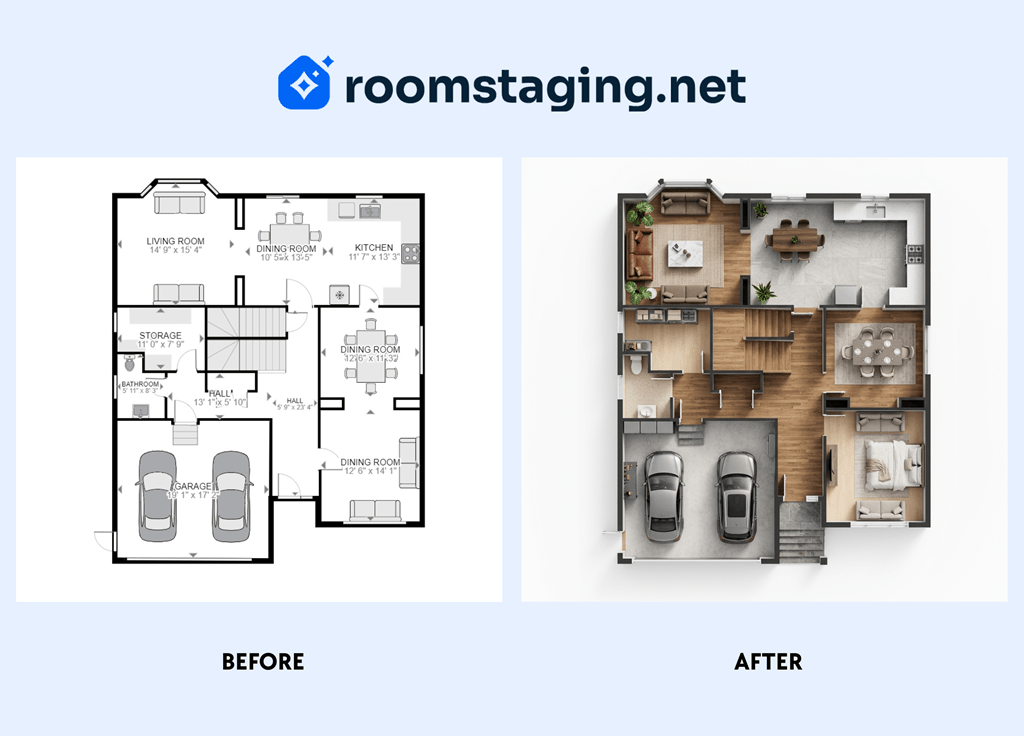 Transformation of a 2D floor plan into a photorealistic visualization using AI
From Sketches to Photorealistic Interior Concepts
Another feature is the transformation of sketches into realistic interiors. In 90% of cases, work used to start with sketches. To turn them into visualizations, it was necessary to rebuild the scene in 3D from scratch.
Thanks to AI, this stage can be skipped. By uploading a sketch to the RoomStaging service, a designer:
- receives a realistic interior based on the composition;
- selects a style (modern, minimal, luxury, etc.);
- instantly visualizes a photorealistic concept.
As a result, the specialist benefits, as ideas can be quickly tested without complex modeling, and the time required to prepare visualizations is reduced to one day.
In Which Situations Virtual Staging Is Especially Useful for Interior Designers
In fact, digital staging in 2026 is effective both at the stage of creating an initial concept and during the presentation of a finished interior. However, in certain scenarios, it delivers maximum impact:
- Concept development from plans or sketches. AI allows you to quickly transform plans and sketches into basic concepts. This helps to test styles, zoning, and compositions without complex 3D modeling and provides more freedom for experimentation.
- Transformation of a floor plan into an isometric visualization. At the stage of conceptual development, when it is necessary to demonstrate volume and zone arrangement to the client, there is no desire to dive into complex modeling. The function of transforming 2D plans into photorealistic 3D scenes saves time and delivers the same effect.
- Early visualization for client understanding. The benefits of virtual staging for an interior design business begin from the start. 3D visualization shows the client an approximate final result (not everyone can imagine it). This reduces discussion time and allows focus on key decisions regarding colors, textures, and furniture.
- Pre-construction or virtual renovation previews. For spaces that are not yet built or have just been renovated, staging shows what the space will look like after completion. Understanding the potential makes clients more willing to invest.
- Multiple units or repeatable layouts. If a designer works with several similar properties (e.g., apartments, offices, hotel rooms), maintaining consistent style and proportions is essential. Virtual staging makes this easier while saving time and resources.
- Client presentations. For commercial or remote clients, digital staging services allow designers to present different design scenarios before work begins. This increases engagement, speeds up decision-making, and improves presentation effectiveness.
- Showcasing renovations or upgrades. When updating an existing space, virtual staging demonstrates “before and after,” highlighting the benefits of changes. Clients evaluate results more easily, often allowing designers to offer higher-priced service packages (by 10–20%) or additional options.
In any case, the cost of virtual staging pays off. Consider this: standard design development (layout planning, color palettes, furniture plans) takes 2–6 weeks, while staging speeds up the process by at least 3 times. The reason is simple – visual clarity reduces the time needed for client approval.
Tips for Interior Designers on Photography
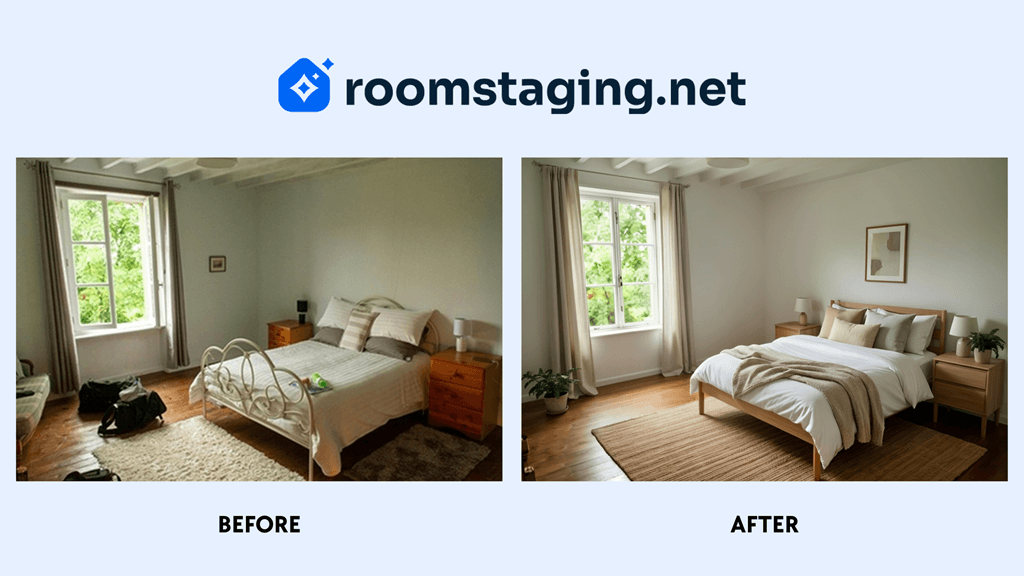 Example of a high-quality and low-quality photo for virtual staging
For high-quality results, the original photo is crucial. AI can improve a blurry or dark image, but the result will not be realistic. To get the perfect base for rendering, follow these recommendations:
| Criterion | Tips |
|---|---|
| Optics | Use a wide-angle mode (0.5x), but avoid the “fisheye” effect to prevent distortion. |
| Quality | Enable HDR and choose the highest resolution. Turn on grid lines for precise alignment. |
| Stability | Use a tripod if possible. Keep the camera at eye level (140–160 cm). |
| Angle | Stand in a corner of the room to capture maximum space. Avoid shooting from the center. |
| Lighting | Maximize natural light by opening curtains and turn on artificial lighting. |
| Clean frame | Remove personal items and unnecessary objects. The frame should be neutral. |
| Horizon | Ensure vertical lines are parallel to the frame edges and corners are not darkened. |
| Free zones | Avoid shooting from positions where furniture will later be placed. |
It is generally considered that the best time for shooting is from 10:00 to 15:00. During this period, natural light is most even, and shadows do not obscure important details. This allows AI to more accurately reproduce colors, textures, and lighting in the final visualizations.
Which Interior Projects Benefit Most from Virtual Staging
Although virtual staging is a universal tool, there are categories of projects where its effectiveness is especially noticeable:
- Compact apartments or studios. Using digital furniture placement, designers can demonstrate functional zones for rest, work, and storage within a small area.
- Family homes or multi-room apartments. Thanks to 3D interior visualization services, clients see specific options for arranging living rooms, children's rooms, or kitchens.
- Renovation or redesign projects. For spaces undergoing renovation or redesign, it is useful to show the potential result using virtual before-and-after interiors.
Additionally, through A/B testing of concepts, designers can present several stylistic solutions for one property simultaneously. This helps quickly determine which approach (minimalism, neoclassical, or modern) resonates with the client and optimize presentations for decision-making.
Popular Styles for Interior Design Project
One of the main advantages of virtual staging is the ability to easily choose a style – and accordingly, colors, palettes, textures, and forms. It is especially convenient to work without limitations: sometimes a client wants a unique interior, sometimes a mix of styles.
| Style | Characteristics | Benefits for Interior Designers |
|---|---|---|
| Minimalism | Clean lines, calm colors (white, gray, beige) | Emphasizes room proportions and allows showcasing zoning options |
| Scandinavian | Light tones, wood, pastel accents, textiles | Easily adapts to different layouts and increases emotional response |
| Loft | Raw brick, concrete elements, metal accents, exposed systems | Highlights character, reduces decor costs, emphasizes urban style |
| Vintage | Wooden elements, color accents (mustard, olive), slim furniture legs | Adds recognizability and emotional engagement in portfolios |
| Modern | Laconic forms, metal and glass accents, neutral base tones | Demonstrates contemporary style and functional solutions |
| Boho | Bright colors, textures, mixed styles and patterns | Allows experimentation with composition and visual accents |
AI capabilities make it possible to create a digital twin for apartment interiors, while designers can show clients an exact copy of a space in different styles, track changes, and optimize layouts even before actual work begins.
How Interior Designers Can Work with Virtual Staging
Separating Concept from Specification
During remote interior design presentations, label visualizations as “Digital Concept.” This is necessary so that the client does not perceive virtual furniture as ready-to-purchase items. Your task at this stage is to approve dimensions and style, not the final product list.
Integration of AI into work with drawings and sketches
If you work in graphic programs (AutoCAD, SketchUp, Archicad), use AI not as a replacement, but as an accelerator. For example:
- create basic geometry or a plan;
- export it as an image;
- generate photorealistic variations using AI.
This allows you to reduce rendering time and move more quickly to approving the concept with the client.
Transparency in Using AI-Assisted Interior Mockups
Do not use staging to hide complex elements such as low beams, exposed piping, or poor layouts. Retouching architectural flaws in AI mockups will lead to conflicts during the project supervision stage.
Saving Time and Testing Ideas
When discussing virtual staging pricing, position this service as a rapid prototyping stage. After all, an interactive virtual room design can be created in less than a day. Moreover, if the project is large, you can hire virtual staging service for interior designers.
Such cost-effective interior visualization helps avoid endless revisions in the final project, as key stylistic decisions are validated early on.
Marketing Potential of Virtual Staging for Designers
Virtual staging allows you not to wait years for renovation completion to update your portfolio. Here are a few tips to showcase expertise and attract new clients:
- Publish full aesthetic concepts on Pinterest, and “Before/After” formats on Instagram and TikTok;
- Show the same space in three different styles to reach a wider audience;
- Publish ready-made solutions for typical residential layouts;
- Run ads using renders;
- Introduce e-Design services – selling quick online consultations with furniture placement based on client photos;
- Use staging for presales by adding visual ideas to commercial proposals;
- Tag furniture manufacturers in virtual images for mutual promotion.
The experience of the RoomStaging team shows that using virtual staging approximately doubles the speed from the first meeting to the final “yes” from the client.
How to Choose a Virtual Staging Service That Won't Disappoint
Choosing a provider is a matter of reputation, so it is recommended to pay attention to four key aspects:
- Realism of lighting and textures. Review the portfolio: do shadows fall naturally, and do fabrics look realistic rather than “plastic”?
- Model library. Make sure the service does not use outdated catalogs. The proposed interior items should resemble those currently available in stores.
- Proportion accuracy. Some services “fit” oversized sofas into small rooms, breaking the scale.
- Speed and number of revisions. Choose a service where minor adjustments (e.g., changing the color of a chair) are made quickly and preferably free of charge.
A high-quality provider handles all technical work. Your time remains free for new projects, while the client receives a stylish concept within 24–48 hours.
Summary: A More Efficient Way to Present and Sell Design Ideas
In the work of an interior designer, the speed and clarity of communication often determine the success of a project. The more clearly the client understands the idea, the fewer revisions, doubts, and delays occur during the process.
Virtual staging changes the approach to presentation: instead of abstract explanations, the designer immediately shows a photorealistic staging render. This simplifies communication and makes it possible to test different options without spending time and resources.
Ultimately, it is a tool that enables faster approvals, stronger presentations, and a more predictable growth of a design business.