
How to Stage a Home Virtually: Step-by-Step Guide
Learn how to do virtual home staging step by step: prepare the right photo, choose the best AI tool, select room type, interior style, and AI model, then generate realistic staged images for real estate listings in seconds.
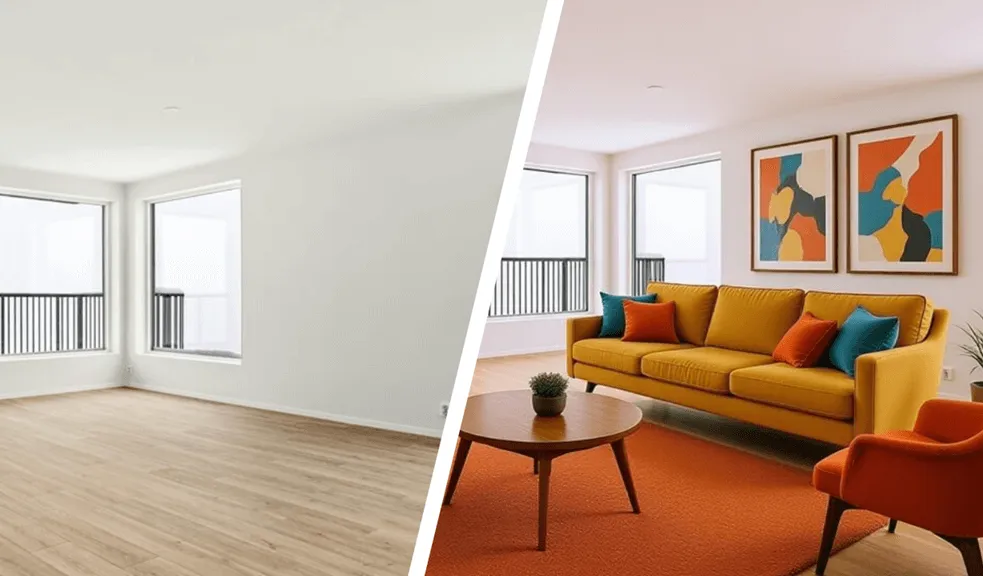
Table of Contents
- Introduction
- Why AI Home Staging Has Become Essential for Today's Real Estate
- What You Should Do Before Uploading a Photo
- Choose the Room Type
- Choose the Best Furniture Style
- Why AI Model Matters
- Image Generation, Editing and Downloading
- How to Choose the Right Photo for Virtual Staging
Introduction
The modern real estate market is changing very fast, and today a high-quality visualization of the object plays no less a role than the price or location of housing. Potential buyers make decisions within the first few seconds of viewing an advertisement, so empty rooms or bad photos often reduce interest in the object. This is why virtual home staging has become one of the most sought-after tools in real estate.
On our platform, we made AI-staging as simple and fast as possible. Users can get a realistic interior in just 15-30 seconds without complex programs and design skills. Simultaneously, the system preserves the geometry of the room - it does not change windows, doors, or the layout of the room, which is especially important for professional real estate listings.
Why AI Home Staging Has Become Essential for Today's Real Estate
Until a few years ago, classic staging required different furniture rentals, decorators, and a lot of time. Today, AI technologies can prepare an object for sale much faster and more cheaply. That's why our best virtual staging is widely used by different real estate agents, many property managers, and also homeowners.
The main advantages of modern AI-based virtual home staging using our platform are:
- Time savings compared to traditional staging;
- No expenses for physical furniture and decor;
- Quick image generation in 15-30 seconds;
- The ability to test different interior styles;
- Realistic visualization without changing the room's geometry;
- Easy preparation of real estate listings for publication.
The additional advantage of RoomStaging.net remains high generation speed, realism of images, and preservation of the original room structure. This is especially important for real estate, where any design distortions can lead to customer distrust.
What You Should Do Before Uploading a Photo
Before uploading an image to our service, it is important to properly prepare the photo and choose suitable generation settings. The quality of the final result and the realism of the interior are directly dependent on this.
How to Properly Take a Photo for Virtual Staging
Even the most modern AI will not be able to show maximum results if the original photo is not taken correctly. Therefore, image preparation begins before the file is uploaded to our platform. The correct perspective, lighting, and composition help the system to analyze the space more accurately, define the room boundaries, and create the most realistic virtual staging.
To get the best result, we recommend following a few simple rules.
- Use natural light. If possible, take photos of the room during the day. Open the blinds and curtains to fill the room with natural light. If there is not enough light, turn on extra lighting. The better the walls, floors, and architectural elements are visible, the more accurate the generation will be.
- Choose the right angle. The best photos are usually taken from the corner of the room. This view allows you to show several walls, part of the floor, and the overall layout of the room. This helps AI to better understand the space and choose furniture more naturally.
- Keep the camera level. Try not to tilt your smartphone or camera up or down. It is best to have the device approximately at chest level. A straight perspective makes the placement visually natural and reduces the likelihood of geometric distortions.
- Prepare the room before shooting. Before taking a photo, it is advisable to remove random objects, boxes, clothing, and other items that do not belong in the interior. The cleaner a space looks, the easier it is for the system to focus on room layout.
- Take multiple snapshots. Don't limit yourself to one photo. Take several shots from different angles and choose the one that best shows the space. Small changes in camera position often affect the final result significantly.
With the right photography, our platform can use all AI capabilities and create the most realistic interiors without altering the room's geometry. A few extra minutes to prepare the shot will help you get a much better result after generating it.
Choose the Right Tool Before Generation
Several AI tools are available on our platform to work with the interior. Each of them is solving its own problem, so it's important to know in advance what outcome you want.
We offer several image processing tools to our users:
- Virtual Staging. This is the addition of furniture and decor in an empty or partially empty room;
- Interior Redesign. Designed to completely change the style of existing interiors for home redesign.
- Furniture Removal. The furniture and unnecessary objects are removed from the room.
- Interior Renovation. A mode for visually updating the decor, materials, and overall condition of the room.
The main difference of Virtual Staging for realtors and homeowners is that this regime focuses on preparing real estate for sale or rental. AI does not change the structure of a room, but only helps to visually show how a space can look after arrangement.
That is why this mode is most often used for real estate listings, where it is important to maintain the realism of the space while making it more appealing to buyers.
Choose the Room Type
After selecting the AI tool, you are prompted to specify the type of room. Many users underestimate this stage, even though it helps AI analyze space more accurately.
The following room types are available on our platform:
- Living Room;
- Bedroom;
- Kitchen;
- Bathroom;
- Dining Room;
- Home Office;
- Kids Room.
Each type of room has its own layout, furniture, and decor. For example, AI designs the Home Office and Bedroom differently, even with the same space.
How AI Uses Room Type Information
When the user selects a room type, AI starts to analyze the room's allocation and select the appropriate interior. This affects the furniture, lighting, composition, and location of objects in the frame.
If the room type is selected incorrectly, the result may appear unnatural. As an example, the system may add inappropriate furniture or distribute space incorrectly. Therefore, the right room selection helps achieve a more realistic outcome and makes staging visually compelling for potential buyers.
Choose the Best Furniture Style
The style of the interior directly affects the perception of the object. The same room layout can look very different depending on the furniture style you choose.
Overview of Available Interior Styles
Our platform offers different design options so you can better adapt your image changes to a specific type and style of your interior:
- Scandinavian;
- Minimalism;
- Bohemian;
- Classic;
- Industrial;
- Coastal;
- Transitional;
- Mid-Century, etc.
Each style caters to a specific audience and property type. For example, Scandinavian and Minimalism are well-suited for modern urban apartments, while Classic is more often used for more expensive objects.
How Different Styles Affect Buyers' Perception
Interior influences not only the room's appearance but also its emotional perception of space. Light minimalist interiors visually increase the space, and an Industrial-style can highlight loft features.
When choosing a style, it's important to consider the property's target audience. For family housing, more comfortable and neutral solutions are usually suitable, while luxury properties often benefit from a more expressive design. In practice, a well-chosen style helps the potential buyer to see themselves more quickly in this space.
Why AI Model Matters
Our system offers to choose an AI Model:
- Smart. This model is best suited for complex rooms and unusual shooting angles;
- Standard. This model is best used for simple rooms and the fastest possible generation.
For rooms with a complex layout, we usually recommend using Smart Mode. But you should also test another model, as the Standard can give excellent results.
Image Generation, Editing and Downloading
After all settings are selected, the image is generated. Processing takes an average of 15 to 30 seconds. As a result, the user gets realistic virtual staging without changing the geometry of the room. You can re-generate the image with different styles or settings to help you choose the best option for your ad.
If you are not satisfied with the result, then select a different AI model, room type, interior style or enter custom instructions. You can then re-generate images an infinite number of times.
Our platform allows you to compare the finished image with the original photo so that you can clearly see the result of virtual staging. If desired, add the note "virtual staged" or "virtually visualized" to the photo.
Also available to users is the function of downloading finished images in different formats and HD quality, as well as upscaling for uploading in 2K or 4K.
How to Choose the Right Photo for Virtual Staging
The quality of the source image directly affects the AI-generation output. Even the most precise virtual staging algorithm works best when the photograph has good lighting, clear room boundaries, and sufficient resolution. Dark images, loud noise, blurriness, or a distorted perspective can degrade the realism of the future interior.
On our platform, AI analyzes walls, floor, corners of the room, and free space, so high-quality interior photos help the system to place furniture, room decor, and lighting elements more accurately.
For best results, we recommend using photos with the following settings:
- bright and natural lighting;
- direct perspective without significant distortion;
- high image resolution;
- minimum visual clutter in the frame;
- clearly visible walls, floors, and corners of the room;
- no harsh shadows or overexposed highlights.
Such training helps AI to understand space more accurately and create more realistic virtual staging results.