
What Is Virtual Staging and How Does It Work

Virtual staging is the digital furnishing of an empty or outdated property photo with photorealistic furniture, using rendering, style transfer, and lighting analysis while preserving the photographed room context.
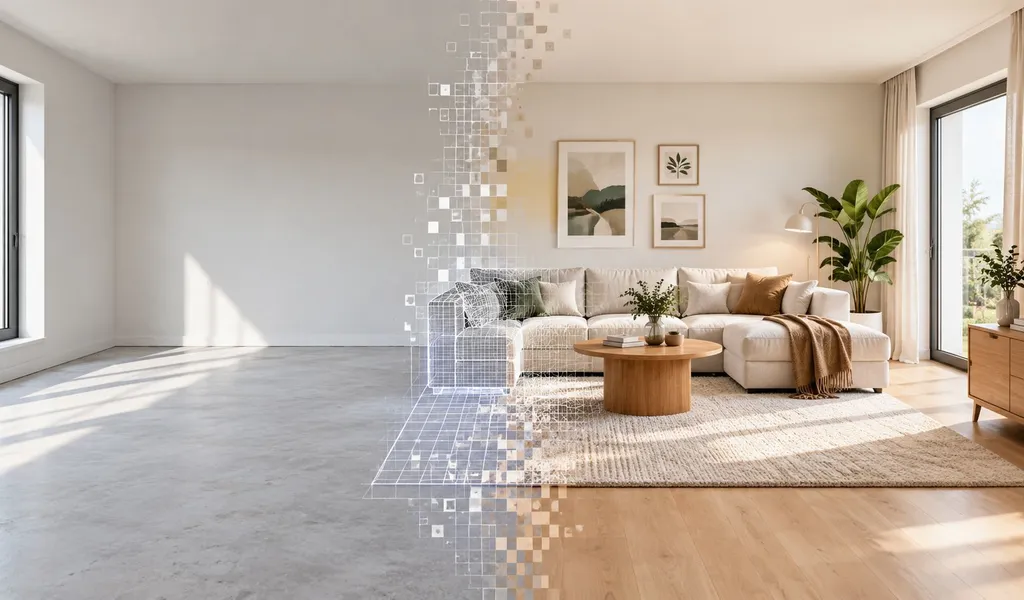
You may be looking at a vacant living room that feels smaller than it is, even though the camera captured the space accurately. A buyer scrolls past because they can't tell whether the room fits a sofa, dining table, or anything beyond a single chair. Virtual staging addresses that visualization problem by adding furniture to the listing image, not by moving anything inside the property.
The useful question isn't only “what is virtual staging?” It's also where the edit stops being staging and starts becoming a different kind of image manipulation. The distinction affects buyer trust, MLS compliance, and whether the final photo still represents the home a buyer will see.
Table of Contents
- A Plain Definition of Virtual Staging
- How the Technology Actually Works
- Virtual Staging Compared to Physical Staging
- What Virtual Staging Changes for Buyers and Listings
- The Typical Workflow and the Disclosure Rules That Come With It
- Common Misconceptions and the Geometry Rule That Holds It All Together
- Who Should Use Virtual Staging and What to Watch Next
A Plain Definition of Virtual Staging
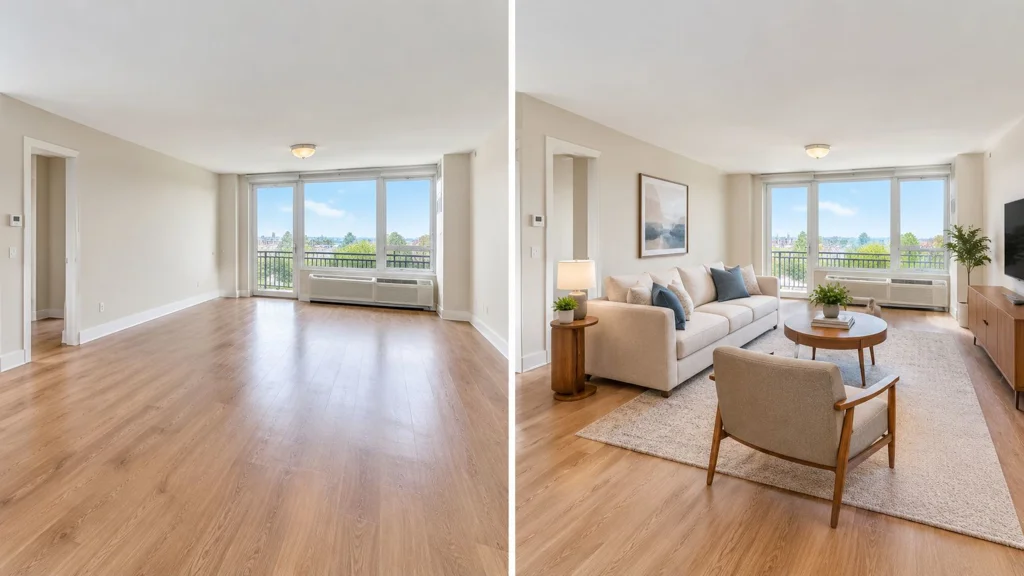
A vacant living room is photographed and uploaded to an MLS listing. After staging, a second version appears beside the original, showing a sofa, rug, coffee table, artwork, and lamps. Nobody carried a couch through the front door. The furniture exists only in the edited image.
That's virtual staging. A service or software system applies digitally generated furniture and décor to an existing property photograph. The process can use 2D and 3D rendering, AI style transfer, perspective matching, and lighting analysis. The output is still based on a real photo of the room.
The distinction matters. The walls, windows, flooring, ceiling height, doors, views, and room proportions belong to the photographed property. The sofa and artwork are digital additions. A credible edit makes those additions appear to occupy the actual floor plane, receive the same light, and align with the room's perspective.
Virtual staging isn't a full digital reconstruction, and it isn't a Matterport-style virtual tour. A virtual tour captures or models a property so viewers can move through it. Photo-based virtual staging takes one existing image and creates a furnished presentation of that same photographed space.
Working definition: Virtual staging is the digital addition of furniture and décor to a real property photo, with the original architecture and geometry left intact.
That definition gives you a practical boundary. If the edit adds movable objects while preserving the room, it can remain a staged photo. If it changes permanent features, invents a room, or removes something a buyer needs to see, you're dealing with renovation visualization, image manipulation, or a 3D render instead.
How the Technology Actually Works
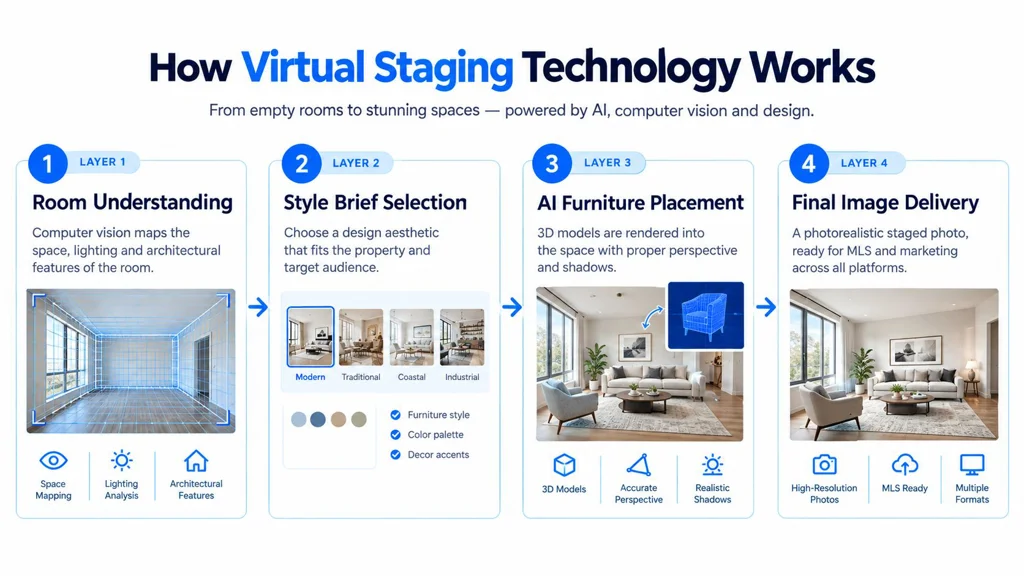
A modern staging pipeline behaves less like pressing a decorative filter and more like asking a digital set designer to prepare a room. The system has to understand the source image before it can place convincing objects inside it. The exact steps vary by platform; AI tools do not necessarily build an explicit 3D scene.
Layer one maps the room
Computer vision can help identify the floor plane, wall boundaries, window openings, doors, passageways, and light direction. Think of a physical stager measuring the room before selecting a sofa. Without that spatial reading, furniture may float, intersect a wall, or sit at the wrong angle.
The system also studies perspective. Lines in the floor, ceiling, and cabinetry help establish vanishing points, while shadows and highlights indicate where light comes from. This analysis gives later stages a reference for scale and placement.
Layer two turns a style brief into objects
You or a preset choose a design direction, such as modern, traditional, Scandinavian, or coastal. The platform then selects furniture and décor from a catalog of photorealistic 3D assets or generates suitable objects according to that brief.
The choice isn't purely cosmetic. A large sectional may communicate the room's capacity, but it can also block a doorway. A narrow console may suit the architecture better than a bulky cabinet. Good staging treats furniture selection as a layout decision, not a collection of attractive objects.
Layer three renders and composites the scene
In a 3D-based workflow, the rendering engine positions the furniture according to the room's perspective and floor plane. It then matches scale, shadows, color temperature, reflections, and material response before compositing the new elements into the original photograph.
Some tools combine generative image editing, upscaling, and lighting adjustments. AI systems may generate image content directly rather than rendering separate furniture models.
Layer four puts a human in control
A designer or reviewer checks whether the furniture is proportionate, whether edges meet the floor correctly, and whether mirrors, glass, metal, and windows reflect believable content. The reviewer should compare the result with the original rather than judging the staged version in isolation. With self-service AI tools, this review is the user's responsibility.
The photographed geometry must remain the source of truth. For a practical look at software workflows and review criteria, see this guide to best virtual staging software.
Virtual Staging Compared to Physical Staging
Agents usually make the choice based on a simple set of constraints. Is the main goal a stronger listing gallery or a furnished presentation during viewings? What budget, property access, and time are available?
| Dimension | Virtual Staging | Physical Staging |
|---|---|---|
| Source material | Requires a real property photo | Uses the actual property |
| Furniture | Added digitally | Delivered and arranged in the property |
| Buyer experience | Helps buyers understand a listing image | Gives buyers tactile, in-person immersion |
| Revisions | Style and layout can be changed without moving objects | Requires restyling, deliveries, and labor |
| Speed | Suited to rapid listing-image production | Depends on inventory, access, and scheduling |
| Geometry | Must preserve the photographed room | Exists physically and can be inspected |
| Disclosure | Added furniture should be labeled | Usually apparent during a showing |
Physical staging wins on tactile realism. Buyers can walk around the furniture and understand how the room feels at walking distance. It makes sense when the property will be shown in person and the seller wants the physical environment to support the listing.
Virtual staging wins when the immediate need is a strong listing gallery. It can restyle a room without delivery logistics, and it lets an agent test a restrained design direction before committing to a physical setup. It can't replace the experience of touring the property.
Use this decision rule: choose virtual staging for a furnished presentation in listing photos; choose physical staging when you also want that presentation during viewings. Both approaches can be used together.
What Virtual Staging Changes for Buyers and Listings
A buyer scrolling through an empty room has to estimate scale, infer its purpose, and decide whether the lack of furniture signals flexibility or a problem. Add a believable sofa, dining table, or bed, and the same photo gives that buyer a reference point. The room becomes easier to read as a living room, bedroom, office, or dining area rather than an undefined box.
NAR's 2025 Profile of Home Staging reported that staging helps buyers visualize a property as a future home. This finding concerns home staging generally, rather than virtual staging alone. The table below describes possible effects, not measured performance results or guaranteed outcomes for every property.
| Aspect | Empty Listing | Virtually Staged Listing |
|---|---|---|
| Buyer interpretation | The room's purpose may be unclear | Furniture communicates a likely use |
| Scale perception | Buyers estimate proportions unaided | Furniture provides visual scale |
| Listing engagement | Provides the comparison baseline | May attract more gallery views |
| Inquiries | Questions may focus on possible use | A clear layout can prompt more specific questions |
| Photo viewing time | Limited visual information | More detail may hold attention longer |
| Future-home visualization | Less visual guidance | Staging helps buyers visualize a property as a future home |
The commercial value begins with comprehension, not persuasion. A buyer can assess circulation, seating, and likely lifestyle faster when a room has a clear function. That clarity may produce more informed tour requests and reduce basic questions about how the space could be used.
The listing gallery still has a hard boundary. Virtual staging can explain an existing room, but it should not turn a narrow layout into an open one, make windows appear larger, or imply that an architectural feature exists when it does not. Those changes belong to a different category, such as structural image manipulation or a 3D concept render.
Poorly chosen furniture can also weaken trust. Oversized pieces distort scale, blocked openings hide useful information, and a luxurious design that conflicts with the property's architecture can make the image feel less credible. The strongest staged image adds enough information to explain the room, but not so much that it competes with the property.
The Typical Workflow and the Disclosure Rules That Come With It
A reliable workflow starts before any AI processing. The photographer captures the room with a wide-angle lens, controlled exposure, and minimal distortion. Straight vertical lines and visible room boundaries give the staging system better information to work with.
The usual sequence looks like this:
- Capture the source photo. Photograph the actual room, including its windows, doors, flooring, and permanent fixtures.
- Upload the image. Send the property photo to a staging platform or professional stager.
- Choose the brief. Specify the room type, preferred design style, furniture direction, and any restrictions.
- Generate the staged version. The system adds furniture and décor while matching the source image's perspective and lighting.
- Review against the original. Check scale, shadows, reflections, door clearance, and whether the edit changed a permanent feature.
- Request revisions. Remove an unsuitable object, correct a placement issue, or select a quieter style.
- Deliver the final file. Export a high-resolution JPG and retain the original image for the listing record.
- Upload with disclosure. Label the image or listing according to the applicable MLS and local requirements.
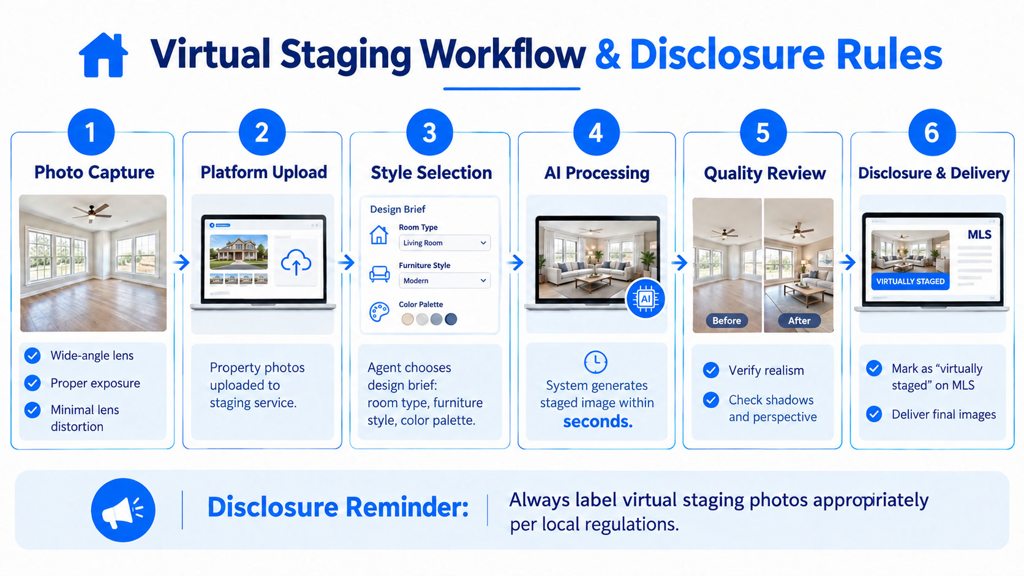
The disclosure should be visible and unambiguous. Common guidance calls for wording such as “Virtually Staged” in the image caption, on-image watermark, or listing remarks. Use the disclosure method required by the applicable rules. Keep an unaltered version available and, where local rules require it, include the original in the gallery.
Permanent features are the hard limit. Don't change walls, floors, windows, fixtures, views, or the apparent condition of the property as part of ordinary staging. Some MLSs also prohibit renovation concepts even when labeled. Local MLS policies differ, so agents should confirm the rule that applies to each listing.
Copyright and licensing deserve the same care. Furniture assets, textures, and generated outputs may be subject to the stager's terms. A signed agreement should state who can use the final images, where they can be published, how long the license lasts, and whether the agent, seller, brokerage, and photographer are covered. That paperwork clarifies usage rights; it does not resolve misleading-image or disclosure issues.
Common Misconceptions and the Geometry Rule That Holds It All Together
Virtual staging can't add square footage, raise a ceiling, move a window, widen a doorway, or improve a view. It can make a room easier to read, but it can't change the physical facts that a buyer will encounter during a showing.
The most common confusion comes from treating every edited property image as virtual staging. These are separate categories:
- Sky replacement changes the sky or exterior atmosphere. It doesn't furnish an interior.
- Furniture removal clears existing objects from a photo. It creates an empty presentation rather than adding a staged lifestyle.
- Virtual renovation previews changes to flooring, paint, cabinets, fixtures, or other finishes.
- 3D rendering can depict a room that hasn't been built or photographed.
- A Matterport-style tour creates an interactive spatial experience rather than a single furnished image.
The geometry rule ties the category together. Digitally added furniture must obey the source room's floor plane, wall angles, vanishing points, openings, and light direction. A sofa can't float above the floor. A rug shouldn't bend according to the wrong perspective. A chair shouldn't block a doorway that was clearly open in the original photo.
Buyers may not explain the error technically, but they notice when the perspective feels wrong.
This is why human review still matters, even when an AI system produces a visually attractive result. Impossible clearances, mismatched shadows, floating furniture, and reflections that don't belong to the room can undermine the entire listing. A reviewer should inspect every image at full size before publication.
Who Should Use Virtual Staging and What to Watch Next
Virtual staging fits listing agents with vacant or dated inventory, sellers who want to control marketing costs, brokerages standardizing their visual presentation, and physical stagers expanding into digital services. It also helps when a room is functional but difficult to interpret from an empty photograph.
The fit is weaker for a fully furnished rental, a new property with an accessible model unit, or a seller who has already committed to physical staging. In those cases, the physical environment may provide more value than a digital gallery image. Virtual staging also shouldn't be used to conceal damage, make a small room appear large, or show renovations as though they're already complete.
The category is moving toward more flexible image editing. Inpainting tools can restyle a room from a single image, and some services also stage 360-degree images. Those capabilities make disclosure more important, not less, because an increasingly polished image can be harder for a buyer to distinguish from a documentary photograph.
In 2026, agents should watch two operational questions. First, do the platforms they use provide clear commercial-use terms? Second, what do local rules require for disclosure and original photos?
The practical starting point is simple. Preserve the original photo, stage only what the buyer can reasonably treat as movable décor, review the geometry, disclose the edit, and show the unaltered room as part of the listing experience. For an agent building a repeatable process, this guide to virtual staging for real estate agents can help turn those principles into a listing workflow.
RoomStaging lets agents upload property photos, choose a design direction, and generate photorealistic staged images while preserving the room's core geometry. Visit RoomStaging to create listing visuals, compare styles, and prepare properly disclosed images for your next vacant or dated property.