
10 Best Free AI Interior Design Apps (2026)

The best free AI interior design apps need to do more than produce attractive inspiration images. They should help you explore a room, compare ideas, and understand what you can actually download or edit before paying. This list includes ongoing free plans, limited free trials, and alternatives whose current trial terms need checking.
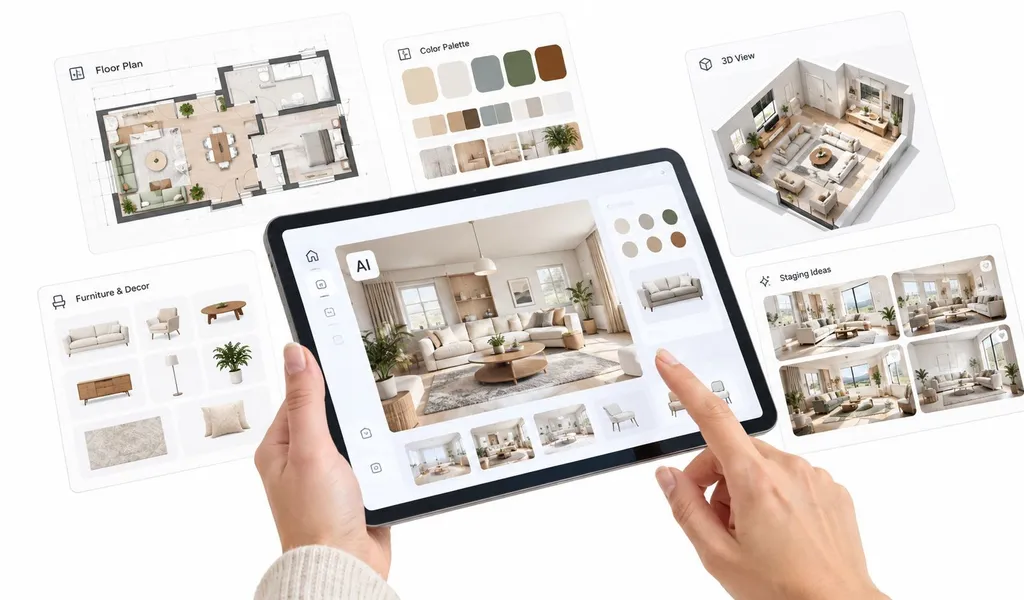
The best free option depends on the job. RoomStaging suits professional staging and redesign workflows, IKEA Kreativ suits product-specific visualization, RoomGPT and MNML AI work well for quick inspiration, and Planner 5D and Homestyler are stronger for editable planning. This comparison looks at free access, pricing, credits, output control, licensing, geometry preservation, speed, and practical use for real estate, staging, redesign, mobile inspiration, and planning.
"Free" can still mean a watermark, a small number of renders, limited export quality, or no commercial rights. A photo-based generator can restyle an existing room quickly, but it won't replace an editable 2D or 3D planner when measurements and furniture placement matter.
Checked September, 2026: This is a comparison of official product, pricing, and help pages, not a hands-on image-quality benchmark. Prices below are in USD; annual billing is identified separately. Where a provider does not publish a clear free allowance or consistent terms, that limitation is stated. Offers, taxes, and app-store pricing may vary.
Table of Contents
- 1. RoomStaging
- 2. IKEA Kreativ
- 3. RoomGPT
- 4. REimagineHome
- 5. Homestyler
- 6. Planner 5D
- 7. Remodel AI
- 8. HomeDesignsAI
- 9. MNML AI
- 10. ArchiVinci
- Top Free AI Interior Design Apps, Feature Comparison
- Choose the App That Matches the Deliverable
1. RoomStaging
RoomStaging is a strong fit for real-estate and design workflows that need one consolidated toolset. It covers virtual staging, interior and exterior redesign, image enhancement, furniture and clutter removal, and interior renovation in one workflow.
A key strength is its focus on geometry preservation. The platform is designed to keep original room structure recognizable, including doors, windows, passageways, and proportions, while changing furniture and finishes. As with any AI generator, inspect each result against the original photo.
Best for real estate and professional redesign workflows
RoomStaging advertises typical generations in 15-30 seconds and offers watermark-free downloads with a commercial photo license on paid plans. 2K downloads require Standard or above; 4K requires Professional or Enterprise. It also offers regeneration for variations, 50+ design styles, saved images, and Enterprise API access. Commercial licensing covers marketing use; it does not itself establish compliance with a particular listing service's rules.
Its practical advantages are a workflow that requires no written prompts, edits to selected items, and staging, cleanup, enhancement, and redesign in one account. Compared with IKEA Kreativ, it is not limited to one retailer's catalogue. Compared with building a 3D scene, working directly from a property photo involves fewer setup steps. It does not provide an editable floor plan or a shopping list of exact furniture products.
Practical rule: Choose RoomStaging when you need commercially usable visuals, fast iterations, and room geometry that stays recognizable.
Pricing and free trial
RoomStaging pricing includes 3 free credits with no card required; trial images are watermarked. Basic costs $19/month, or $12/month billed yearly, with 100 credits per month on either billing schedule.
One generated image costs one credit. On eligible plans, a 2K download costs 3 additional credits, and 4K costs 5 additional credits.
2. IKEA Kreativ
IKEA Kreativ is one of the clearest examples of a free interior visualization tool with a defined commercial purpose. It helps users capture a room, remove existing items digitally, and place furniture and décor from the IKEA catalogue.
The important distinction is that this isn't a general AI redesign app. It's a shopping and visualization environment built around IKEA products. If you already know that you want IKEA furniture, seeing those products inside your own room is more useful than receiving a generic image filled with furniture you can't identify or buy.
Best for product-specific visualization
IKEA Kreativ runs through the IKEA app and web experience. Users can capture a space, experiment with catalogue items, and review product pricing and availability while planning the room. Full 3D room scanning requires a supported LiDAR-equipped device; photo-based and prebuilt-room options provide other ways to begin. See IKEA's device compatibility guidance.
That creates a practical workflow for homeowners who are deciding whether a sofa, storage unit, rug, or lighting product will fit visually. It also reduces the gap between inspiration and purchase because the furniture shown in the concept is tied to real products.
Practical rule: Choose IKEA Kreativ when product accuracy matters more than stylistic freedom.
Pricing and free access
IKEA Kreativ is free to use, with no separate design subscription. Furniture purchases are separate.
It is one of the clearest ongoing free options on this list. Its main limitation is the IKEA catalogue: it is not a way to preview arbitrary furniture brands or generate unrestricted style makeovers.
3. RoomGPT
RoomGPT is built for speed and low-friction experimentation. Upload a room photo, choose a style, and receive redesigned variations without working through a complex planner or learning a 3D interface.
Its strongest use case is inspiration. Someone deciding between modern, minimalist, Scandinavian, or another visual direction can get a quick sense of how the room might change. Sign-in is required to use the current design page.
Pricing and free trial
RoomGPT's offer 1 free credit, as well as credit packs priced at $9 for 30 credits, $19 for 100 credits, and $29 for 200 credits.
There is no subscription, and unused purchased credits do not expire. That is useful for occasional projects. Its photo-based outputs do not provide an editable 2D or 3D room plan.
For a quick visual test, RoomGPT is practical. For a listing package or repeated client revisions, you need to confirm export rights and output consistency before relying on it. A broader explanation of how these generators work appears in this AI interior design guide.
4. REimagineHome
REimagineHome combines photo-based redesign with virtual staging, exterior concepts, and product-linked ideas. It's a useful middle ground for homeowners and real-estate users who want more than a single style filter but don't need a full CAD-style planning environment.
The platform supports interior redesign, exterior and garden concepts, and staging from uploaded photos. Product suggestions add practical value because the result can point users toward items that resemble the generated furniture or finishes.
A useful conversational workflow
The conversational design companion is a differentiator on Pro and higher plans. Users can refine a direction through instructions, reference photos, and incremental edits. Pro also includes real-product discovery and listing batch processing. Essential uses legacy tools and excludes conversational editing, reference-photo guidance, real shoppable products, and next-generation high-resolution output.
Pricing and free trial
REimagineHome pricing offers 5 free designs with no card required. Essential is $19/month for 30 credits; Pro is $36/month for 200 credits.
A design-only generation costs 1 credit; product discovery plus visualization costs 2 credits. Conversation without a generated output does not consume credits. The free trial is limited, and its Pro-level experience should not be mistaken for what the cheaper Essential plan includes.
Use REimagineHome when you want broad concept exploration with product context.
5. Homestyler
Homestyler is more of a planning environment than a simple photo restyler. Its 2D and 3D tools let users arrange furniture, explore layouts, and view a room from different perspectives.
That difference matters. Photo-based AI interior design tools can quickly replace furniture and finishes, but they don't necessarily give you an editable scene. Homestyler is better when the user wants to learn how a layout works, test furniture placement, or build a more structured visualization.
Where the free plan fits
The free Basic experience supports core layout and 3D exploration. AI features and image-based redesigns use in-app credits, so the most advanced AI tools are limited on the free plan.
The platform also has community resources and tutorials, which help users who aren't familiar with 3D planning. The downside is a learning curve. If you only want to upload a living-room image and see three style variations, learning the full planner may be unnecessary; its separate AI image tools still use credits.
A photo restyle answers “what could this look like?” A planner helps answer “can this layout work?”
Pricing and free plan
Homestyler's free Basic plan includes unlimited 1K renders and 3 AI credits in total. These are separate allowances: its listed AI Stager cost is 10 credits per image, while AI Render costs 25 credits for 2K or 35 for 4K. The three included credits alone are therefore insufficient for those AI image tools.
That makes it a strong free option for editable planning and standard 1K rendering. Pro+ is advertised from $6.80/month, with the actual price dependent on the selected billing term and promotion; higher-resolution rendering, larger AI allowances, and watermark removal are paid upgrades.
Homestyler is a sensible choice for room planning, furniture placement, and professional 3D presentations. Its editable scenes offer more control than a flat generated image, but creating a scene takes more setup than a basic photo makeover. For a related professional workflow, see this guide to virtual staging software.
6. Planner 5D
Planner 5D combines AI generation with editable 2D and 3D planning. That makes it one of the better choices for users who don't want to stop at a generated image.
Its AI Studio generates and edits images, while Plan Recognition can turn an uploaded floor plan into an editable 3D project. These are different outputs: an AI Studio image does not automatically become an editable room model. The planner is the part that lets you continue adjusting walls, rooms, and furniture.
Better for planning than one-click redesign
Planner 5D's free plan includes unlimited projects and access to 50% of the furniture catalogue across web and mobile. Full catalogue access, floor-plan recognition, and more advanced rendering require paid plans.
The platform is available on web and mobile, but its depth brings complexity. Someone preparing a renovation concept may appreciate editable walls, rooms, and furniture. Someone checking whether a different sofa style suits a photograph may find the interface slower than a photo-based generator.
Planner 5D works particularly well when dimensions, furniture arrangement, and presentation scenes matter. Its AI Studio also supports photo-based redesign and staging, but image-generation credits and editable planning features should be compared separately.
Pricing and free plan
Planner 5D Premium costs $19.99/month or $59.99/year. Professional costs $49.99/month or $399.99/year and adds features such as unlimited 4K renders and CAD export. A 7-day PRO trial is available on eligible platforms and renews automatically; check the offer's renewal terms.
Choose Planner 5D when you need to keep editing a room layout. A photo-first tool can be simpler when you only need a visual concept.
7. Remodel AI
Remodel AI focuses on photo-first redesign. It supports interior and exterior concepts, virtual staging, paint and floor changes, garden design, and object removal from a source image.
Its practical strength is combining whole-room makeovers with focused changes to paint, flooring, and unwanted objects. It aims to retain the original room structure, but architectural accuracy is not guaranteed; inspect doors, windows, and proportions in each result.
Pricing and free trial
Remodel AI offer 3 free designs, with standard-quality output, 30+ styles, and eight AI tools. It offer Pro at $29/month and Premium at $49/month. Pro adds HD downloads and watermark removal; Premium adds the Hyper Realism model and more parallel generations.
The free tier is useful for evaluation. The pricing FAQ assigns commercial use to Premium and Ultra, so do not assume Pro includes it. The same page contains inconsistent annual-savings and “unlimited” wording; use the stated plan quotas and confirm the final billing period and licence in the purchase offer.
Remodel AI suits quick photo-based makeovers and focused finish changes, with a small free allowance before paid use.
8. HomeDesignsAI
HomeDesignsAI takes a broad suite approach. It covers interiors, exteriors, gardens, room styles, and material changes in one browser-based interface. Its suite also includes selected-object editing, reference-image styling, furniture discovery, and virtual staging, with access dependent on the plan.
That makes it useful for broad concept work, especially when a project moves between indoor, outdoor, and styling ideas. It is less about editable planning and more about fast photo-based variation across several design directions.
Pricing and trial availability
HomeDesignsAI offer Standard at $22/month with 100 credits, Pro at $29/month with 1,000 credits, and Expert at $37/month with 2,000 credits. Annual introductory offers are separate from these monthly prices.
Its public pricing does not clearly specify a fixed free-generation allowance. Check the current trial offer for any charge, card requirement, included credits, and renewal terms. Treat it as a paid alternative unless that offer confirms usable free access; do not assume every advanced tool is included in Standard.
It fits early-stage exploration well, especially for users who want one tool for interior, exterior, and staging ideas.
9. MNML AI
MNML AI is better known in architecture and exterior visualization circles, but it also supports interior concept generation. That gives it a slightly different position in this list from pure room restyling apps.
Its workflow accepts photos, sketches, and screenshots of 3D models for architectural concept development. Architects and design-focused users may find it more aligned with early-stage concept development than consumer shopping visualization.
Better for exterior and architectural concept work
MNML AI stands out when a project includes façades, exteriors, or architecture-led ideation alongside interior spaces. It is not primarily a furniture-placement or room-planning tool, so it should be judged on concept generation rather than editable layout control.
Pricing and free trial
MNML AI gives new users 100 free credits with no card required; those signup credits do not expire. Lite costs $29/month for 1,000 credits, which the provider estimates as roughly 100 Fast renders or 30 Ultra renders. A credit is not the same as an image.
Paid plans include its AI tool suite, 8K upscaling, and a commercial license. Unused subscription credits can roll over, capped at two months' worth. The free allowance is a one-time starting balance, not a replenishing free plan.
Choose MNML AI when you want broader architectural concepting with AI assistance. For users focused mainly on interior shopping previews or dimensioned room layouts, other tools in this list may be more practical.
10. ArchiVinci
ArchiVinci covers AI rendering for architecture and interiors, including conceptual visualization from sketches, models, and scene references. It is more expansive than a simple one-click room restyler.
That broader scope makes it relevant for architects, visualization studios, and advanced design users who want AI help across multiple presentation stages.
A broader visualization tool for architecture and interiors
ArchiVinci is useful when the project moves beyond decorating a single room photo and into architectural presentation, concept imagery, or visualization workflows that combine interiors and exteriors.
It accepts image inputs such as sketches, floor plans, and screenshots from modelling software, and includes furniture removal and selected-area edits. Its outputs are visualizations, not editable CAD or BIM models.
Pricing and free trial
ArchiVinci advertises 3 free, watermark-free renders, including commercial usage rights. Its published subscription options include $79/month or $549/year. One-time access packages are also available; check the pricing page for their current terms.
Paid plans include unlimited renders with the ArchiVinci engine, while other AI models and video tools consume coins. The free offer is a small trial, not ongoing unlimited rendering.
Top Free AI Interior Design Apps, Feature Comparison
The table separates ongoing free access from limited trials. Paid prices use monthly billing unless an annual option is explicitly shown; credits are not directly comparable across tools.
| Tool | Free access | Paid option | Best for | Key limit |
|---|---|---|---|---|
| RoomStaging | 3 credits; no card | $19/month for 100 credits; or $12/month billed annually | Home staging, cleanup, and redesign from property photos | 2K/4K need eligible plans and extra credits |
| IKEA Kreativ | Ongoing free use | No design subscription | Previewing real IKEA furniture | IKEA catalogue; full 3D scan needs supported hardware |
| RoomGPT | 1 credit; no card | $9 for 30 credits | Occasional room-style experiments | No editable room plan |
| REimagineHome | 5 credits; no card | $19/month for 30 credits | Conversational edits and product-linked ideas | Chat, references, and real products require Pro+ |
| Homestyler | Basic: unlimited 1K renders; 3 AI credits total | From $6.80/month | Editable 2D/3D layouts | Included free AI credits cannot cover a 10-credit Stager image |
| Planner 5D | Unlimited projects; half the furniture catalogue | $19.99/month or $59.99/year | Floor plans and editable room layouts | Full catalogue and advanced rendering are paid |
| Remodel AI | 3 standard-quality designs | $29/month | Photo makeovers and finish changes | Confirm billing and commercial-use tier |
| HomeDesignsAI | No | $22/month for 100 credits | Interior, exterior, and garden concepts | Trial terms and advanced tools vary by offer/plan |
| MNML AI | 100 one-time credits; no card | $29/month | Sketch/model-based architectural concepts | Credit cost varies by rendering engine |
| ArchiVinci | 3 renders | $79/month or $549/year | Architectural and interior visualization | Unlimited applies to its engine; other tools use coins |
Choose the App That Matches the Deliverable
The best free AI interior design apps aren't interchangeable. The right choice depends on whether you need a shopping preview, a style experiment, an editable layout, or a commercially usable property image.
Choose RoomStaging when you need one tool for virtual staging, redesign, enhancement, furniture removal, and renovation concepts. Its workflow requires no written prompts, includes commercial licensing on paid plans, and uses one credit per standard generation. Those are practical advantages for repeated property-photo work; factor in the plan requirements and extra credits for 2K/4K downloads.
Choose IKEA Kreativ when the decision centres on IKEA products. Its catalogue-based workflow is more useful than a generic generator when you need to see real furniture in the room and consider product pricing and availability.
Choose RoomGPT for quick, low-friction inspiration. It fits users who want a fast browser-based experiment without learning a planning system. Its non-expiring credit packs suit occasional use; confirm any free allowance when signing up.
Choose Homestyler or Planner 5D when you need editable layouts and 3D planning. These tools are stronger for furniture placement, spatial experimentation, and presentations where the scene must continue evolving after the first render.
Choose REimagineHome or HomeDesignsAI for broad concept exploration across interiors, exteriors, gardens, materials, and styles. Their wider tool coverage helps when a project moves beyond one room, but credit models and plan restrictions need close attention.
Choose Remodel AI for photo-based makeovers, paint and floor changes, and object removal. Check both the download quality and the commercial-use tier before using the result in a client or listing workflow.
Choose MNML AI or ArchiVinci when the brief extends into architecture, exterior concepts, or presentation-led visualization. These tools are more useful for design ideation than for basic shopping previews or simple room restyling.
Before choosing any tool, test representative photos. Use the actual types of rooms you handle, including empty spaces, cluttered interiors, difficult angles, and exterior views. Then inspect the free-tier watermark, export, credit, and licensing restrictions rather than judging the product only by its free button.
Free access varies sharply between an ongoing planning account, a one-time credit balance, and a time-limited subscription trial. A tool that works for personal inspiration may be unsuitable for a property listing or client presentation.
For a professional decision, compare the final output against the deliverable. Ask whether the room geometry remains believable, whether the image resolution is sufficient, whether the furniture looks realistic, whether you can make another iteration, and whether the license covers the intended publication. Those checks matter more than a long feature list.
RoomStaging turns property photos into visuals for virtual staging, interior and exterior redesign, enhancement, furniture removal, and renovation concepts, with advertised generation times of 15-30 seconds. Visit RoomStaging to test a consolidated workflow for property listings, design concepts, and commercial visual delivery.