
Spacely AI vs RoomStaging: which AI tool is better for property photos?
Looking for a Spacely AI alternative for real estate? In RoomStaging, every tool has the same price: 1 credit per image, whether you stage an empty room, remove furniture or redesign a facade. Results are ready in 15–30 seconds on every plan. Virtual staging starts at $19 a month – it's not the $50 plan.
- 3 free credits
- No credit card required
- 1 credit per generated image
Same photo, two AI tools: see the difference
Compare furniture scale, light, and whether walls, windows and sloped ceilings stay in place.
Example 1 – Virtual staging for an empty living room
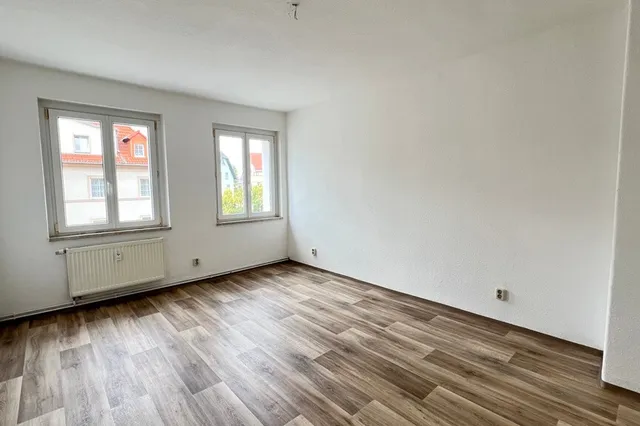
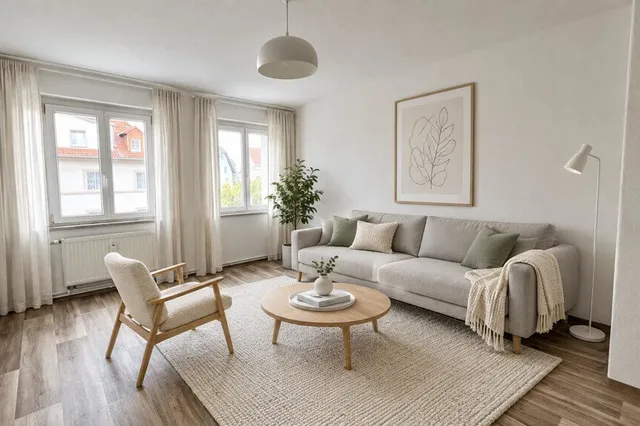
RoomStaging · 27 sec · 1 credit ($0.07)
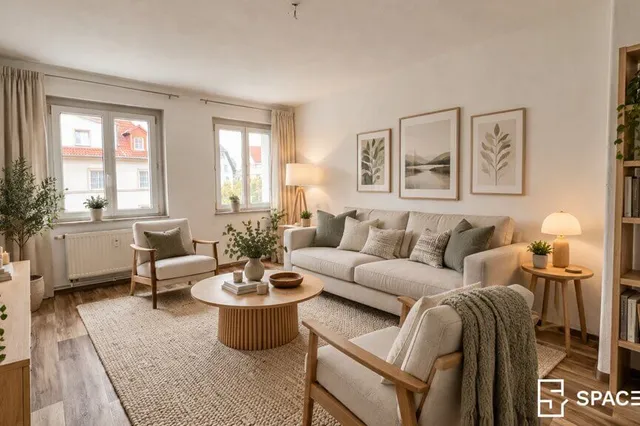
Spacely AI · 1 min 15 sec · 5 credits ($0.17)
Example 2 – Declutter and furnish a living room
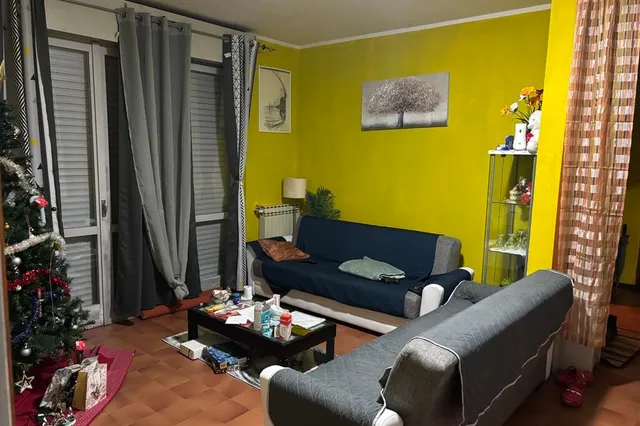
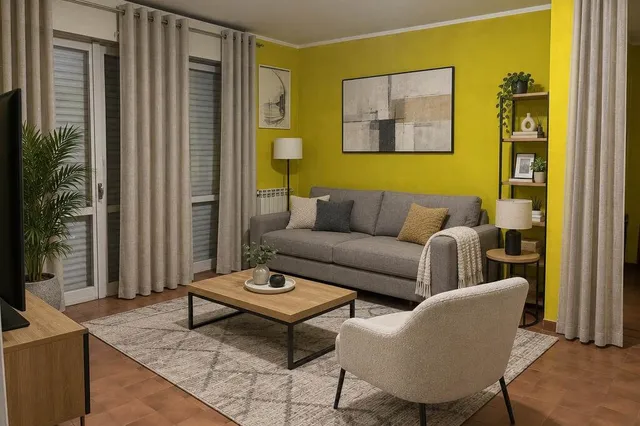
RoomStaging · 25 sec · 1 credit ($0.07)
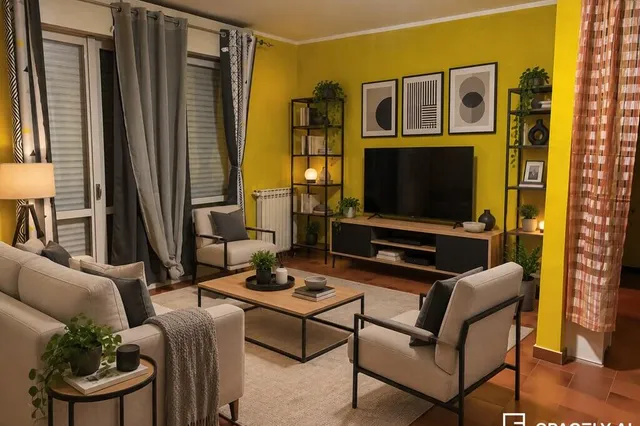
Spacely AI · 1 min 28 sec · 14 credits ($0.47)
Example 3 – A new style for a furnished bedroom
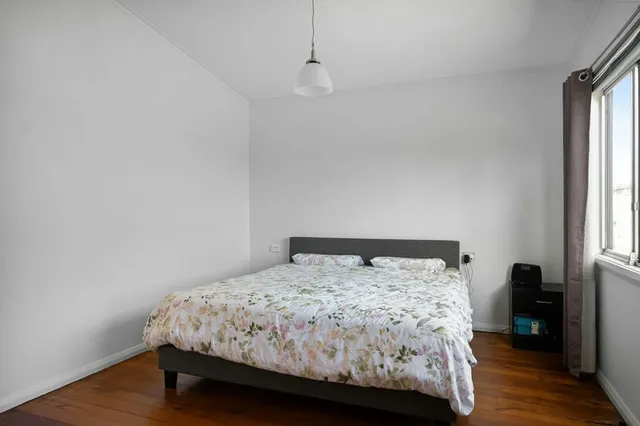
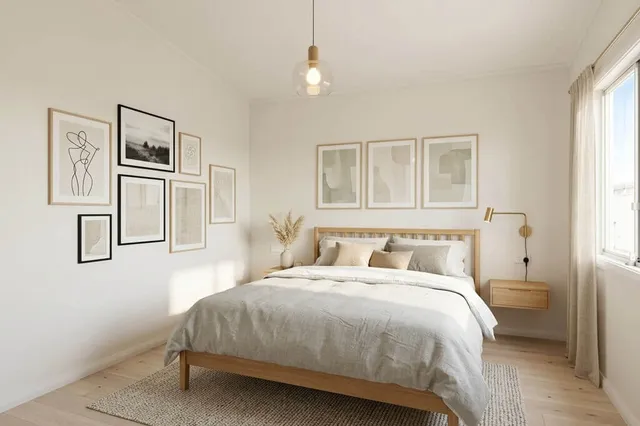
RoomStaging · 24 sec · 1 credit ($0.07)
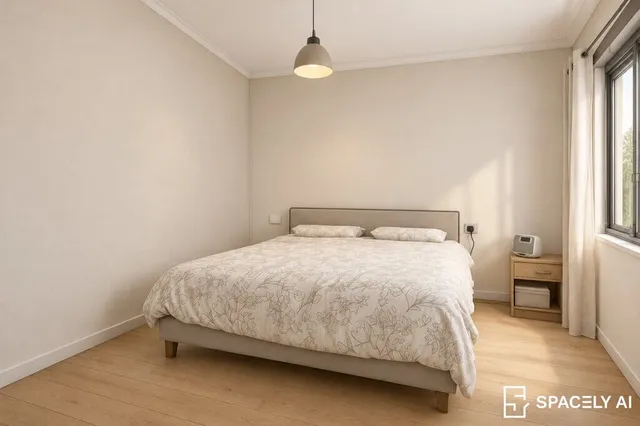
Spacely AI · 55 sec · 8 credits ($0.27)
Strengths and limits of each tool
RoomStaging
- Keeps walls, windows, doors and proportions intact
- Virtual staging and item editing on every plan
- Exterior and landscape design included
- Results in 15–30 seconds on every plan
- 1 credit = 1 image, with premium AI model
- 50+ room types and design styles
- Image enhancement and 2K/4K upscaling on Standard+ plans
- Basic: 100 monthly credits for $19
- 3 free credits, no credit card required
- Unused monthly credits expire
- No plugins for SketchUp, Revit or Rhino
Spacely AI
- Plugins for SketchUp, Revit, Rhino and AutoCAD
- Unused credits roll over while you stay subscribed
- Style Transfer from your own reference image
- Virtual staging starts on $50 plan
- Point & Edit and 4K output starts on $50 plan
- Images on the Personal plan carry a watermark
- Tools cost 2 to 16 credits, so the price per photo varies
- Every retry is charged at the full tool price
- About 5 minutes in the queue on the Personal plan
- 30–40 free credits cover only 3–4 renders
Verdict
Spacely AI fits design studios and architects who start their projects in SketchUp or Revit and need dozens of render modes. RoomStaging is the ideal choice for realtors, photographers, and property owners working with real property photos. You get a realistic result in seconds and a price you can predict: 1 credit for any image, with virtual staging included from $19/month. As our tests showed, RoomStaging also more accurately preserves walls, windows, and room proportions.
RoomStaging vs Spacely AI: feature comparison
Based on our tests on the same photos and on publicly listed plans, November 2026.
| Feature | RoomStaging | Spacely AI |
|---|---|---|
| Free trialTest before you pay | 3 credits = 3 images, no card | 30–40 credits = 3–4 renders, no card |
| Starting priceLowest monthly plan | $19 / 100 credits (or $12/month billed yearly) | $25 / 500 credits |
| Cost per imagePrice per generated image | $0.19 on Basic, from $0.07 on larger annual plans | from $0.33 |
| Generation timeHow fast your result is ready | 15–30 seconds on every plan | Personal ~5 min, Studio ~3 min, Agency ~1 min |
| Virtual stagingFurnish empty rooms | Yes, on every plan | Studio plan and higher |
| Exterior designA new look for the house | Yes | Limited |
| Edit specific itemsChange one piece, keep the rest | Yes, on every plan | Studio plan and higher |
| 4K upscalingSharper images for listings | Standard plan and higher | Studio plan and higher |
| Preserves room structureKeeps the original walls, windows and doors | Yes | Not always |
| Watermark-free downloadsImages ready to publish | All paid plans | Studio plan and higher |
| Design software pluginsSketchUp, Revit, Rhino | No | Yes |
| Multilingual interfaceAvailable in your language | Yes | No |
Why Switch to RoomStaging
One credit, any tool
Virtual staging, interior design, exterior design, landscape design, object removal and renovation all cost 1 credit per image.
Virtual staging from $19/month
Furnish empty rooms on the Basic plan, without a watermark and without moving up to a $50 subscription. 100 monthly credits cover 100 images.
Seconds, not a queue
Every plan gets the same speed: 15–30 seconds per image. No slower queue on the cheapest plan and no extra fee for priority.
New design, same structure
Our AI analyzes the walls, windows, doors, ceiling height and camera angle. The new design fits the real frame, so the photo still shows the property buyers will visit.
Built for property photos
RoomStaging starts from a photo of a real space, not a design file. Tools and styles are made for listings, renovation plans and client presentations.
Start free, no card needed
3 free credits give you 3 generated images, with no card required. Upload the photo you tested elsewhere and compare the results yourself.
How to transform your property photos
Just three simple steps to turn any room or house photo into a beautiful, photorealistic design.
- 1
Upload your photo
Start with the room or house you want to redesign.
- 2
Choose your preferences
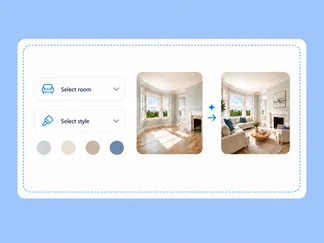
Select the tool, room type and style. Add extra instructions only if you wish.
- 3
Generate and download
Your result is ready in 15–30 seconds. Download it in high resolution.

Got questions?
Find answers to common questions about Spacely AI and RoomStaging.
Is Spacely AI free?
New users get 30–40 one-time credits with no card. Most render tools use 8–10 credits, so that covers 3–4 results. RoomStaging gives you 3 free credits, which is 3 generated images with any tool.
How much does Spacely AI cost?
Personal costs $25/month for 500 credits, Studio $50 for 1,500 credits and Agency $100 for 3,500 credits. Yearly billing lowers these to $20, $40 and $80. Top-up packs start at $9 for 200 credits.
How many credits does a Spacely AI render use?
It depends on the tool: 2 credits to remove a background, 4 to remove all furniture, 8 for Realistic Render, 10 for Auto Furnish and 16 for Creative Render Pro.
Can I do virtual staging on the Spacely AI Personal plan?
No. Auto Furnish, Point & Edit and 4K start on the Studio plan at $50/month, and Personal images carry a watermark. In RoomStaging, virtual staging is part of every plan, from $19/month.
Which is faster: Spacely AI or RoomStaging?
Spacely AI's speed depends on the plan: about 5 minutes in the queue on Personal, under 3 minutes on Studio and under 1 minute on Agency. RoomStaging generates images in 15–30 seconds on every plan.
Which generates more realistic results for property photos?
In our side-by-side tests, RoomStaging produced more natural furniture scale, lighting and textures for real estate photos. Results vary by photo, so upload the same one to both tools and compare.
Is RoomStaging cheaper than Spacely AI?
Yes, especially for virtual staging. RoomStaging Basic gives you 100 credits for $19/month ($0.19 per image), and from $0.07 on larger annual plans. Spacely AI starts at $25/month for 500 credits, but virtual staging needs the $50 Studio plan, where Auto Furnish uses 10 credits ($0.33 per image).
What is the best Spacely AI alternative for real estate?
RoomStaging offers virtual staging, interior and exterior design, landscape design and object removal in one plan, at 1 credit per image.
Can I switch from Spacely AI to RoomStaging easily?
Yes. Create an account, upload the photo you used before, choose a tool and style, and generate. You start with 3 free credits and no card. Cancel your Spacely AI subscription separately.
Ready to make the switch to RoomStaging?
Join 10,000+ agents, homeowners and designers using RoomStaging. Start with your photo now.
Try RoomStaging for free- 3 free credits
- No credit card required
- Results in 15-30 seconds